We’re always working to make our no-code recipe building as intuitive as possible. Our new features, Upsert and Smart Data Mapping, do just that, making recipes shorter to read, easier to build and backed by the same powerful integration capabilities you know and love.
Upsert Object for Salesforce
We’re simplifying the way Workato recipes are built and read with the new Upsert feature. Upsert is a combination of the words “Insert” and “Update.”
For Workato specifically, it is the process of inserting and/or updating data from one app into another app without creating duplicates – a very common scenario for our users. In other words, when we’re syncing data between apps, we often run into situations where the data we’re inserting from App 1 may already exist in App 2.
We don’t want duplicate data, so we need to check to see if it already exists – if it does, we update it, and if it does not, we create it.
Let’s imagine that when a new Ticket is created or updated in Zendesk, we want to sync it with the corresponding Salesforce Case.
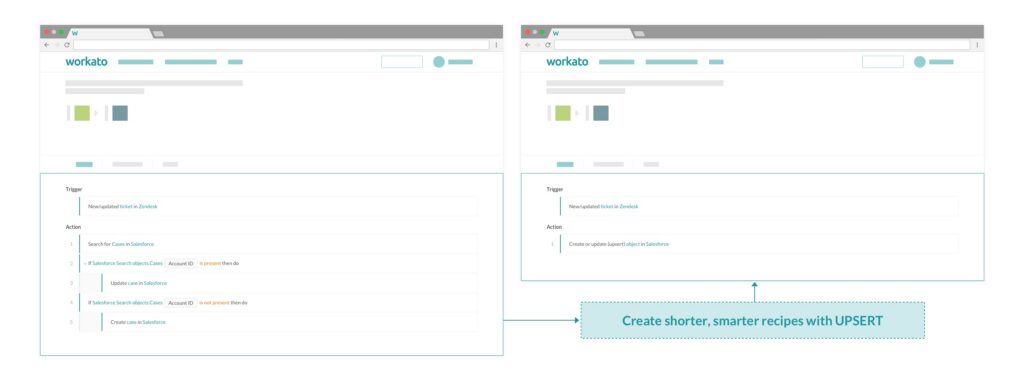
If you have created a Workato recipe before, you are probably very familiar with the logic snippet shown below – a new or updated ticket in Zendesk triggers the recipe, then Workato searches for the matching case in Salesforce, if it exists, we update it, if it doesn’t, we create a new case.

Now, with the new Upsert feature, the very same recipe as above will look like this:

To configure an Upsert, just select the Object (‘Salesforce Case’ in this example) and then specify the Key Field you want to use to look up this object (this is the same as what you would have used in the ‘search’ action – so in this example, ‘Account ID’).

Right now, Upsert is only available for Salesforce. We will be adding support for the Upsert feature for other apps as well, so keep an eye out or let us know what apps you want to use Upsert with in the comments!
Smart Data Mapping
Smart Data Mapping means we can help guide you as you build your recipe. We’ll now offer automatic suggestions for how to map a specific field based on the actions/triggers you have used in your recipe. The auto-suggest kicks into action anytime you select an input data field. Check it out:

Our auto-suggestions learn from data mappings done by Workato users. We look at the data and offer up the best recommendations.
As a result, you may not see a lot of recommendations for certain fields, but we are working on adding to our corpus and refining the algorithm so we can offer even more great recommendations.
We hope these new features continue to make recipe building one of the easiest and most effective ways to build robust automations across your apps. Let us know your feedback or any suggestions for new features you might have.