If your accounting team works like most, then its approach to cash reconciliation is largely manual.
This inherently prevents your organization—like many—from achieving a continuous close, where your banking information and your general ledger are in sync day-to-day and your accounting team has an accurate, real-time view of its finances.
To successfully and easily perform continuous close at scale, you can turn to cash reconciliation automation.
We’ll define this type of finance automation, review how it can work using a real-world example, and explore some of the benefits it offers. That way, you’ll not only have a solid understanding of what it is, but also how you can put it to use at your organization!
What is cash reconciliation automation?
Cash reconciliation automation involves the use of automation to streamline your cash reconciliation process end to end. This includes the step of adding your bank transactions to your ERP system (e.g. NetSuite), as well as posting each bank transaction to the general ledger within the system, instantly.
How to implement an automated reconciliation process
Joe Blanchett, a Product Manager at SeatGeek, offers up a solution by outlining the automation he’s built:
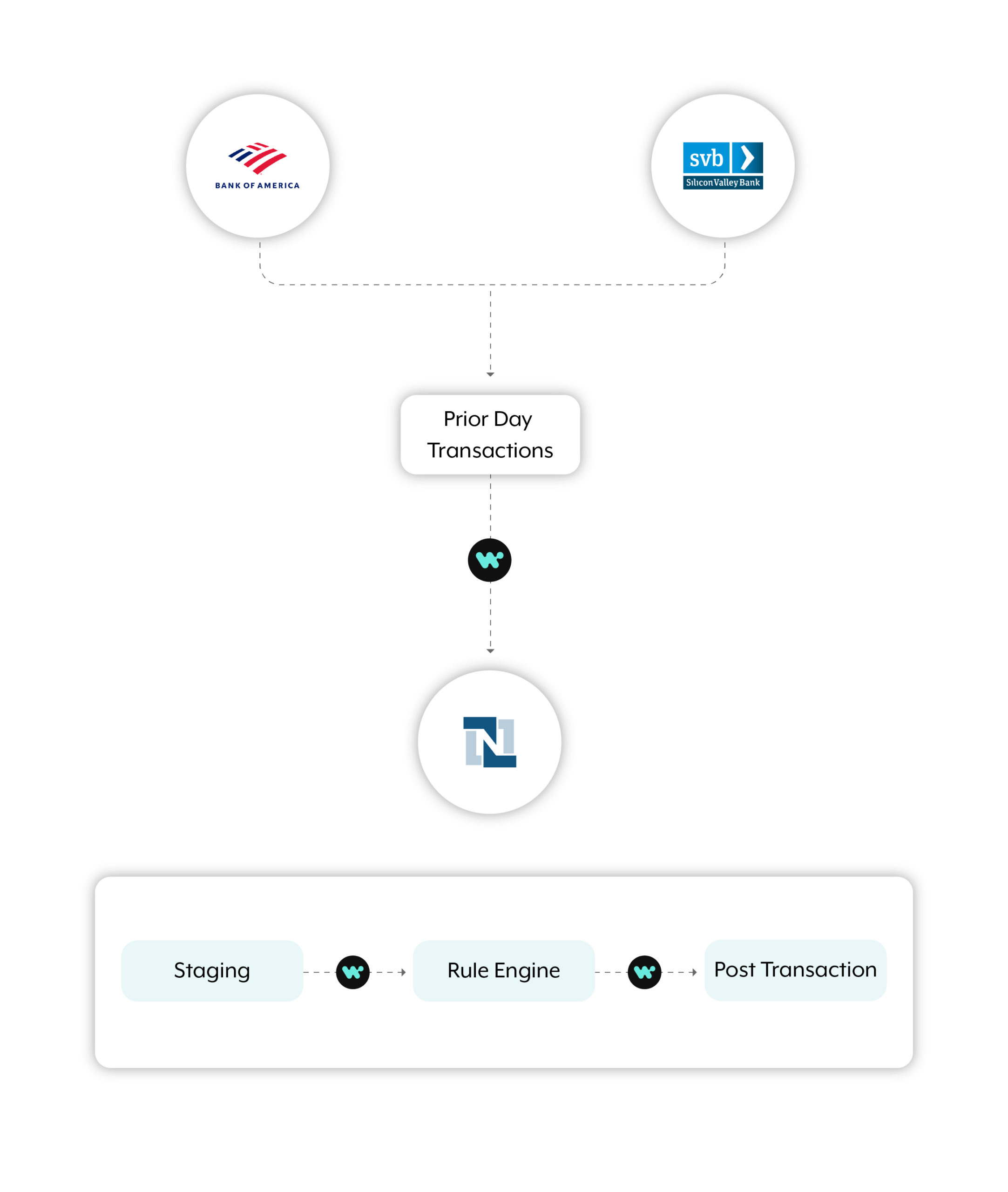
The end-to-end automation involves 2 separate recipes—or steps that Workato, an enterprise automation platform, follows to get work done between your apps.
Recipe 1:
On a daily cadence, all of the bank transactions from the previous day are deposited into their ERP system—in this case, NetSuite—using an SFTP file.
Recipe 2:
Once a new file is in NetSuite, the 2nd workflow gets triggered. The bank statement’s line items run against a pre-set rule engine (set up in Workato), which works in real time to identify and post the transactions.
What did Blanchett and his team experience after building this automated cash reconciliation workflow? And what can you expect by building one yourself? We’ll answer both questions next.
Related: An example of payroll automation
4 benefits of having an automated reconciliation system
Though you can point to several benefits, here are a few that stand out:
1. It saves employees time
The process of logging into your bank account, downloading your statement, uploading it to your ERP system, reviewing the line items, and then posting the transactions can take your team hours.
Streamlining this workflow allows your team to save time, which they can reallocate towards more strategic, business-critical work.
It also prevents your team from making costly mistakes during each step of the process, whether it’s neglecting to post a certain transaction or downloading the wrong statement.

2. It minimizes headcount
With significant time savings under your team’s belt, you’ll also gain significant cost savings in the form of lower headcount. For example, at SeatGeek, they were able to save half a headcount (or roughly 20 hours of work per week).
Related: Benefits of procure-to-pay automation
3. It improves employee satisfaction
If your accounting team can perform more engaging, thoughtful work day-to-day, there’s a higher chance they’ll be engaged in their role. According to Gallup, this leads to higher retention, productivity, company profit, and improved customer experiences.
4. It boosts your team’s performance
A continuous close enables your accounting team and your colleagues across finance to use real-time data when making critical decisions. This alone should improve your department’s performance, as well as its reputation at the organization.
Ready to build a cash reconciliation automation similar to SeatGeek’s? Want to build one that works differently? You can talk to an automation expert at Workato to explore your options and to learn more about our enterprise-grade, low code/no code platform.