
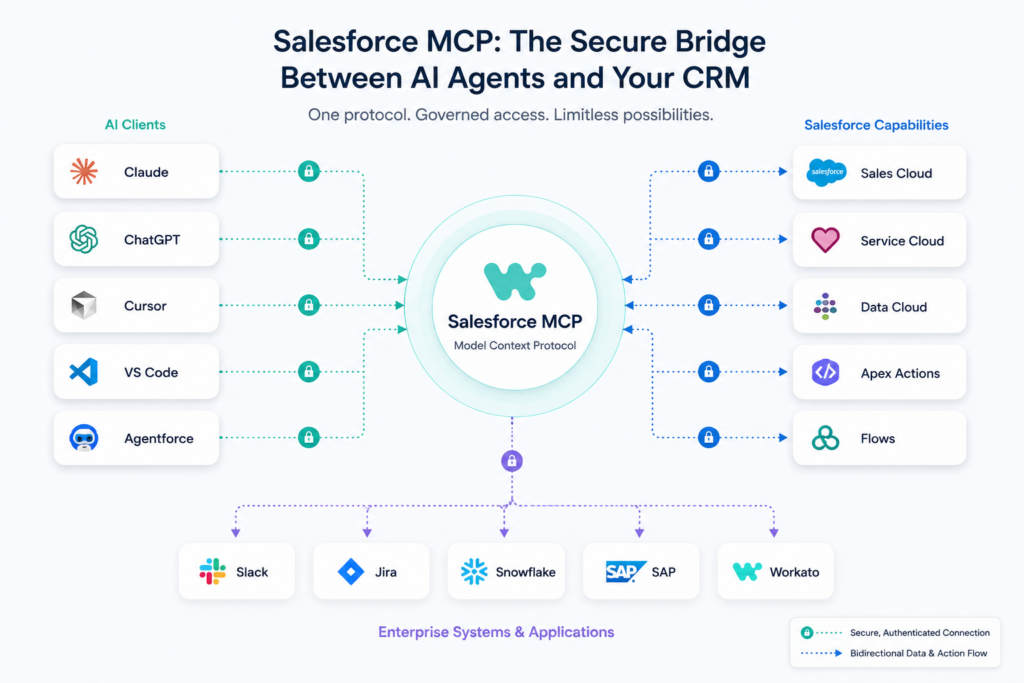
TL;DR Article Snapshot
- Salesforce MCP is a commercial implementation of the Model Context Protocol (MCP) that enables AI agents to securely access and manipulate your Salesforce data.
- It is a client-server architecture with the AI client, like Claude or Agentforce, connecting to an MCP server on Salesforce, and all interactions are associated with an authenticated user.
- Use cases include updating records, querying pipelines, and orchestrating multi-system workflows via integration platforms like Workato using simple prompts.
- Leveraging Salesforce MCP results in a low-code, governed bridge that transforms how teams interact with Salesforce, moving from manual overhead to conversational automation.
Prior to MCP’s arrival, adopting AI agents required standalone integrations for each platform. This approach created redundant workflows, elevated maintenance overhead, and heightened security vulnerabilities.
Salesforce Model Context Protocol addresses these inefficiencies directly. By offering a unified interface, it empowers AI agents to interact with your records and execute operations under strict governance.
In this post, we’ll explain what Salesforce MCP is, how it works, how to set it up, recommended approaches, and how to use Workato to extend your enterprise workflows.
What Is Salesforce MCP?
Salesforce MCP refers to Salesforce’s support for the Model Context Protocol (MCP), an open standard that enables secure connections between AI assistants and LLMs with external systems, tools, and data sources.
It enables AI agents (such as ChatGPT, Claude, or other AI apps) to access Salesforce data and perform actions via a standardized interface, rather than needing to integrate each AI tool into Salesforce.
The premise of Salesforce MCP is that users shouldn’t have to switch between apps; they can simply ask an AI assistant for what they need. The AI assistant will then securely access the live data or perform the business process in Salesforce for them.
How Does Salesforce MCP Work?
Salesforce MCP is a managed implementation of the open Model Context Protocol. It allows AI agents to connect to your Salesforce org and perform actions on your data using natural language, without requiring custom integration code from each tool.

What Is the MCP Stack?
The MCP architecture is a client-server architecture consisting of:
- Host: the AI application to which the client connects and which processes the interaction and commands.
- Client: operates within the host to communicate with the MCP servers.
- Server: describes its own capabilities and makes data, tools, and services available.
What Salesforce MCP Servers Are Available?
Salesforce offers a variety of MCP servers for various applications:
Standard Hosted MCP Servers
Salesforce pre-builds and manages these servers. They are in a disabled state, and an admin needs to enable them.
- SObject Servers: perform CRUD operations, SOQL queries, and search on Salesforce records.
- Data 360: enables agents to access and search for consolidated customer information with SQL and traverse data graphically.
- Tableau Next: allows agents to find semantic models, get dashboard details, and ask questions about KPIs.
Custom MCP Servers
These are bundled tools from various standard servers, or they add custom logic for “persona-specific” servers. With custom MCP servers, you create and host your own infrastructure.
But Salesforce lets you expose Apex actions and Lightning as MCP tools flows directly from the platform. Let’s look at how you achieve this.
Apex Actions: Make methods that are annotated with @InvocableMethod available as AI calls. These may contain sophisticated business-process logic, calculated information, and multi-object cross-data traversal logic. And they can deliver intelligence rather than just data.
Lightning Flows: Make auto-launched flows available as a tool for declarative automation.
MCP can surface existing API endpoints and Lightning component controller methods without writing any additional code for Apex REST and Aura-enabled methods.

How Do You Get Started With Salesforce MCP?
Here are the steps you’ll need to take in order to get started with Salesforce MCP.
What Are the Prerequisites?
Before you start, ensure you have:
- Salesforce system administrator access to create and set up the required apps and settings.
- An MCP-compatible AI client like Claude Desktop, Claude Code, Cursor, or another client that supports the MCP.
- MCP service enabled.
How Do You Configure a Hosted MCP Server?
There are two major steps to configuring a hosted MCP server: creating an external client app (ECA) for authentication and activating the desired MCP server.
Step 1: Creating the External Client App
- To create a new external client app, select Apps > External Client App Manager and click New External Client App.
- Fill in the basic information (name, contact email, etc.).
- Enable OAuth on the API section and add a callback URL (the URL of your specific client). Add these two required scopes:
- Access Salesforce-hosted MCP servers (mcp_api).
- Perform requests at any time (refresh_token, offline_access)
- Only check these two items in the Security section:
- Require Proof Key for Code Exchange (PKCE) extension for Supported Authorization Flow.
- Issue JSON Web Tokens (JWTs)-based access tokens for named users.
- Click Create.
Once the app has saved, go to the app’s Settings tab, then expand OAuth Settings and copy and paste the Consumer Key. This is required to connect to your AI client.
Step 2: Activate the Hosted MCP Server
Pre-built servers are inactive by default and are available in Salesforce. Here’s how to activate them.
- From Setup, look in the Integrations section and select API Catalog > MCP Servers.
- Click on the name of the server you want to activate. Use of sObject-reads for read-only access is recommended for a secure start.
- On the server’s detail page, click Activate.
How Do You Connect an AI Client to Salesforce?
Here’s how to set up your AI client using Claude as an example:
- In Claude Desktop, select Settings > Connectors > Add Custom Connector.
- Paste the Salesforce MCP server URL you copied from the Salesforce MCP server page.
- Copy and paste the OAuth Consumer key from the external client app you created.
- Click Connect. A browser window will pop up, asking you to log into Salesforce and grant the app access.
- Once authenticated, you can seamlessly access the server’s tools directly from Claude.
If you are using other clients or the command line, you may need to set up a file such as claude_desktop_config.json or use the mcp-remote package to connect the two.
What Are the Best Practices for Using Salesforce MCP?
Now, let’s discuss some of the best practices to employ while using Salesforce MCP.
- Use read-only servers, such as sObject-reads, to add value and reduce risk. Increment write capability as confidence builds.
- Use a governance gateway (such as Workato) to enforce centralized policies, like setting token budgets and rate limits.
- Manage access of specific users to specific permission sets and to the specific external client apps they can access. Block unauthorized external client app access.
- Use the Salesforce DX MCP server to scan your Apex classes and identify anti-patterns, which helps you prioritize your fixes.
- Before connecting a third‑party MCP server to an org, run security scans on the servers.
- Use clear names for tools and detailed descriptions in tool documentation, including sample requests and responses, to improve developers’ experience and enhance the reliability of your agents.
- Test a few tools, collect feedback, and slowly roll them out, not all at once. And avoid overloading the AI’s context window and limiting your governance capabilities.

How Does Workato Extend Salesforce MCP for Enterprise Workflows?
Workato’s pre-built, governed MCP servers bring Salesforce MCP to a full enterprise orchestration layer, allowing AI agents to integrate with hundreds of systems.
With its enterprise MCP platform, Workato provides AI-ready servers equipped with OAuth 2.0 user authentication, role-based access control, and comprehensive audit trails, allowing for the tracking and authorization of every AI interaction.
Organizations can convert existing Workato recipes and API integrations to be MCP server-based. This often happens when they transform hundreds of existing automations into skills that other agents can call via the API without any code rewrite.
The orchestration layer in Workato allows agents to write workflows across Salesforce, Slack, Jira, and more applications in a single, controlled, and managed workflow, with key capabilities such as memory management, rollback, and transactional integrity for more complex multi-system workflows.
Wrapping Up
The Salesforce MCP is a major step forward and will change how teams interact with their CRM. It enhances the Salesforce ecosystem with unparalleled accessibility and AI-driven automation. However, the potential of this technology isn’t just limited to one platform.
This is where Workato comes in. Workato takes Salesforce MCP to a new level of enterprise-wide orchestration, securely connecting Salesforce data and AI agents with hundreds of other applications and systems. See how you can use Workato to orchestrate your workflows.
FAQ
What Is Salesforce MCP?
Salesforce MCP is a standardized method for AI assistants and agents to safely access Salesforce data, information, and actions.
What Is the Security Mechanism Used in Salesforce MCP?
All MCP tool calls are executed under the permission of the authenticated user. This means the agent adheres to CRUD permissions, field-level security (FLS), and record-sharing rules.
Can Salesforce MCP Perform Actions, or Is It Only for Reading?
It can do both. Salesforce MCP can retrieve data and trigger operations like creating tasks, updating opportunities, running Flows, calling Apex actions, or running business processes.
How Do Organizations Benefit from Using Salesforce MCP?
Salesforce MCP streamlines integration, speeds up AI implementation, and enhances governance. Instead of creating and maintaining multiple AI integrations, organizations can share the capabilities of Salesforce just once.
This post was written by Mercy Kibet. Mercy is a full-stack developer with a knack for learning and writing about new and intriguing tech stacks.