
The moment AI went from useful assistant to “why can’t it just do this?” and what it takes to close that gap.
In October 2024, we gave all 1,000 Workato employees access to ChatGPT Enterprise and Claude for Business.
The initial uptake was steady but unremarkable. People used it for drafting emails, analyzing data, brainstorming ideas. Standard AI assistant stuff. Usage hovered around 150-200 chats per day.
Then we did something different. We connected Claude to read-only MCP servers across our business systems: Gong, Snowflake, Salesforce, Jira, Gmail, Slack.
Within two weeks, usage jumped 700%.
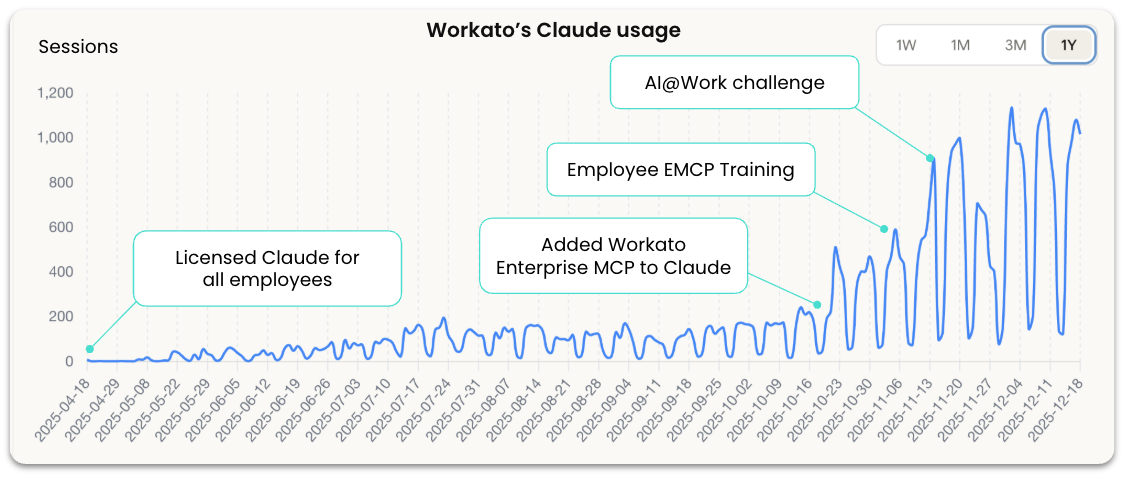
This wasn’t just people playing with a new toy. Teams started building real applications. Sales reps were using an Account Intelligence Dashboard that pulled data from Salesforce, Gong, and Slack to prep for calls. CSMs built Portfolio Analytics that surfaced at-risk customers across their entire book of business. Product managers created Customer Story Mining tools that analyzed months of call transcripts to identify feature requests.
Something fundamental changed. AI could now pull actual business context and provide recommendations grounded in what was really happening in our business.
A sales rep could ask: “What objections came up in my last three calls with this prospect?” and get an answer based on actual call transcripts.
A support engineer could ask: “Show me similar tickets from the past month” and get results from real case data.
A product manager could ask: “What feature requests came up most in customer calls last quarter?” and get an analysis of actual conversations.
That context made AI exponentially more useful. It went from a generic assistant to something that understood your specific business reality.
But then, almost immediately, everyone hit the same wall.
The Moment the Gap Reveals Itself
Once people saw what AI could do with context, they wanted it to do more.
The Account Intelligence Dashboard was generating perfect customer health score analysis. “Can it just update the at-risk flag in Salesforce?”
The Competitive Battle Cards tool was pulling great context from recent calls and win/loss data. “Can it generate the comparison doc and send it to the rep?”
The Call Analysis system was producing excellent coaching summaries. “Can it create a coaching task and assign it to the manager?”
The answer was no. Because MCP servers were read-only. AI could see business context and make brilliant recommendations. But it couldn’t act on them.
That gap, between what AI can suggest and what your business needs it to do, is where every enterprise gets stuck.
This wasn’t a limitation of the AI models. Claude and ChatGPT are incredibly powerful. They could reason about the problem, understand the context, and propose the right solution.
The limitation was infrastructure. We had given AI the ability to see. We hadn’t yet given it the ability to safely execute.
Why “Just Let AI Do It” Is Harder Than It Sounds
Here’s the fundamental problem: when a customer gets a refund, when an invoice gets paid, when inventory gets ordered, those actions have to happen correctly, every single time. Your business can’t run on “probably right.”
But AI is, by design, probabilistic. It makes intelligent suggestions based on patterns, but it doesn’t guarantee outcomes. That’s what makes it powerful for analysis and risky for execution.
You can’t just “turn on write access” and hope for the best. You need infrastructure that wraps deterministic business logic around AI outputs. You need:
- Conditional logic that validates when an action should actually execute
- Approval workflows that route decisions to humans when stakes are high
- Access controls that limit what data an agent can see and modify
- Audit trails that track every action an agent takes
Without that orchestration layer, AI stays stuck in read-only mode. It can suggest brilliantly. But it can’t do anything.
From Context to Action
After watching where people kept hitting walls, we took the next step. We enabled write operations, but with the orchestration controls that made those actions safe.
Now AI could take action: create Jira tickets, update Salesforce records, trigger workflows, send emails, query and write to data warehouses. But every action ran through Workato’s orchestration layer, which enforced the rules that kept those operations predictable.
AI decides what to suggest. Workato decides what gets executed.
Two weeks later, we announced a company-wide hackathon. People came with real problems, walls they’d already hit, and a clear understanding of where they needed AI to be smart and where they needed it to be controlled.
What the Hackathon Revealed
Hundreds of submissions are being reviewed. The projects built before the hackathon (Account Intelligence, Portfolio Analytics, Battle Cards, Proposal Generation, Customer 360) became templates that teams adapted for their specific needs. But every adaptation followed the same pattern.
Support engineer: Built a workflow where AI drafts responses to common tickets, but requires human approval before issuing refunds over $500.
Finance analyst: Built a month-end close process where AI gathers data from multiple systems and flags exceptions, but routes anything unusual to a controller before posting.
Sales ops lead: Built an agent that pulls context from Salesforce, Gong, and Slack to prep reps before customer calls, but blocks access to pipeline forecasts and deal terms.
Every use case follows the same pattern: AI is allowed to be intelligent where that’s valuable. Workato forces it to be predictable where that’s required.
That’s not a limitation. That’s what makes AI safe enough to use in production.
The Infrastructure Gap
If your organization is experimenting with AI assistants that can analyze and suggest but can’t take action, you’re not alone. Most enterprises are in exactly the same place.
The problem isn’t the AI models. The models are powerful enough.
The problem is the gap between what foundation models provide and what enterprises need to run AI in production. That gap is governance, orchestration, and trust at scale.
Here’s what we learned you actually need:
- Context unlocks value. AI becomes exponentially more useful when it can see your actual business systems. Read-only access to real data makes recommendations go from generic to genuinely helpful.
- The gap reveals itself organically. Once people see what AI can do with context, they immediately want it to take the next step. You don’t have to manufacture that requirement. It emerges naturally.
- Write operations require orchestration. You can’t just “turn on” execution and hope for the best. You need infrastructure that wraps business logic around AI outputs: validation rules, approval workflows, access controls, audit trails.
Workato Enterprise MCP is that infrastructure layer.
We provide the connection to business systems that gives AI context. We provide the orchestration controls that make it safe to move from suggestions to execution. We let AI be brilliant at reasoning. We make sure your business processes stay predictable.
We built it because we hit this gap ourselves. And we’re sharing these stories because the only way to prove infrastructure works is to show what people build on top of it and what doesn’t work without it.
Next in this series: Next in this series: We’ll explore how Workato teams built some of the enterprise applications that drove adoption, including Account Intelligence Dashboards, Sales Proposal Generation, and Customer 360 for Renewals. For each, we’ll break down what it does, how it was built, and the orchestration controls that made it safe.