
Today we’re introducing Workato Labs: a home for experimental, open-source developer tools that bring Workato into modern AI-native workflows. Whether you’re coding yourself or working alongside an AI assistant, this toolkit makes it easier to build with Workato where you already work.
Developers are building differently. AI coding assistants like Claude Code, Cursor, and Windsurf have become part of the development workflow, helping generate code, refactor applications, and build integrations from the terminal or editor. We built Workato’s developer tools to fit naturally into that way of working, so you can build, test, and manage recipes from your IDE, use AI agents to generate and extend automations, and ship production-ready integrations without leaving your development environment.

AI is good at understanding intent. It still needs context.
An AI agent building a Workato workflow is filling in the blanks: syntax, file structure, connector behavior, even whether its own output is correct. Because a model’s training data may be limited, those guesses often produce workflows that look valid but don’t work.
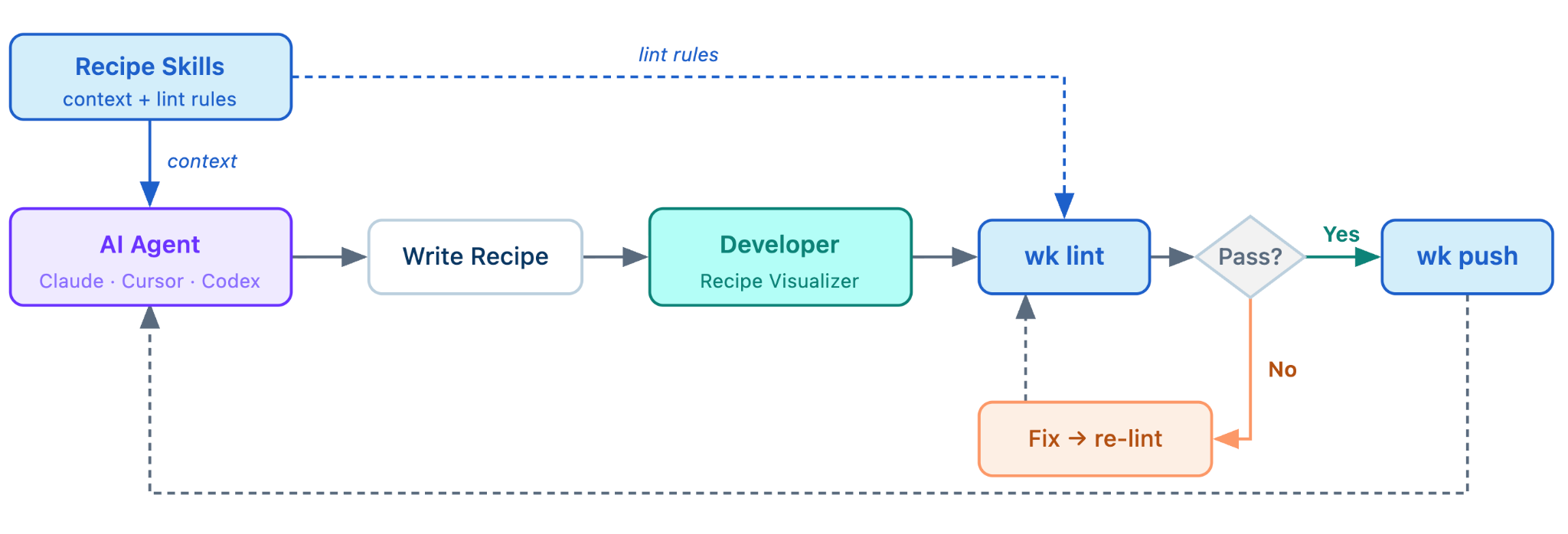
We came to a simple rule: don’t make AI guess. Give it the context it needs, then validate the rest. In Workato, the logic behind an automated workflow is called a recipe. Recipe Skills provide the platform and connector knowledge models don’t have, while Recipe Linter catches issues locally before deployment. Teams can also extend the rules to enforce their own standards.
AI is good at understanding what a developer wants to build. It shouldn’t be responsible for deciding whether that recipe is correct, safe to deploy, or ready for production. Those are deterministic problems, and they deserve deterministic answers. Workato Labs gives developers the tools to combine AI with validation and guardrails, so what gets deployed is something they can trust.
Let developers work where they choose
Developers have never had more choice in how they build.
Some prefer VS Code. Others live in Codex or Claude Code. Some spend their day in the terminal. Increasingly, AI agents are in the loop throughout the development process. The common thread isn’t the tool, it’s the expectation that every platform should fit naturally into the way developers already work.
That’s one of the reasons we’re launching Workato Labs.
We’re bringing Workato into the environments developers love. You can create, validate, version, and deploy Workato assets without leaving your code editor, and you keep everything that makes Workato an enterprise platform: managed execution, governance, and the connectors you already run in production.
What’s launching today
Workato Labs launches with four tools. Each covers a piece of the developer lifecycle; together they form a workflow an agent can drive end to end.
wk CLI
A modern command-line interface that makes Workato programmable from the terminal. Pull, push, diff, validate, and manage Workato assets using workflows that feel natural to software developers.
Whether you’re scripting deployments, wiring Workato into CI/CD, handing the work to an agent, wk CLI becomes the bridge between your development environment and Workato.
Recipe Linter
AI can generate a first draft. It shouldn’t be responsible for deciding whether that draft is correct.
That’s what wk lint, our recipe linter, is for. It validates Workato workflows locally before deployment, catching issues like datapill syntax, schema mismatches, and structural errors. These checks are deterministic, meaning they should produce the same answer every time, regardless of which model generated the workflow.
It also keeps AI focused on what it does best. Instead of spending tokens rereading thousands of lines of JSON to validate structure, models can focus on building. wk lint handles validation quickly, consistently, and at no cost.
Recipe Skills
Because recipe JSON isn’t in the training data, an agent on its own is guessing blind at connector configuration, datapill syntax, and control flow. Recipe Skills give it that knowledge directly: structured so a coding agent can consume it before it writes a line. Point your agent at the skills first, and its guesses become informed instead of invented. (It’s also where connector-specific lint rules live.)
Recipe Visualizer
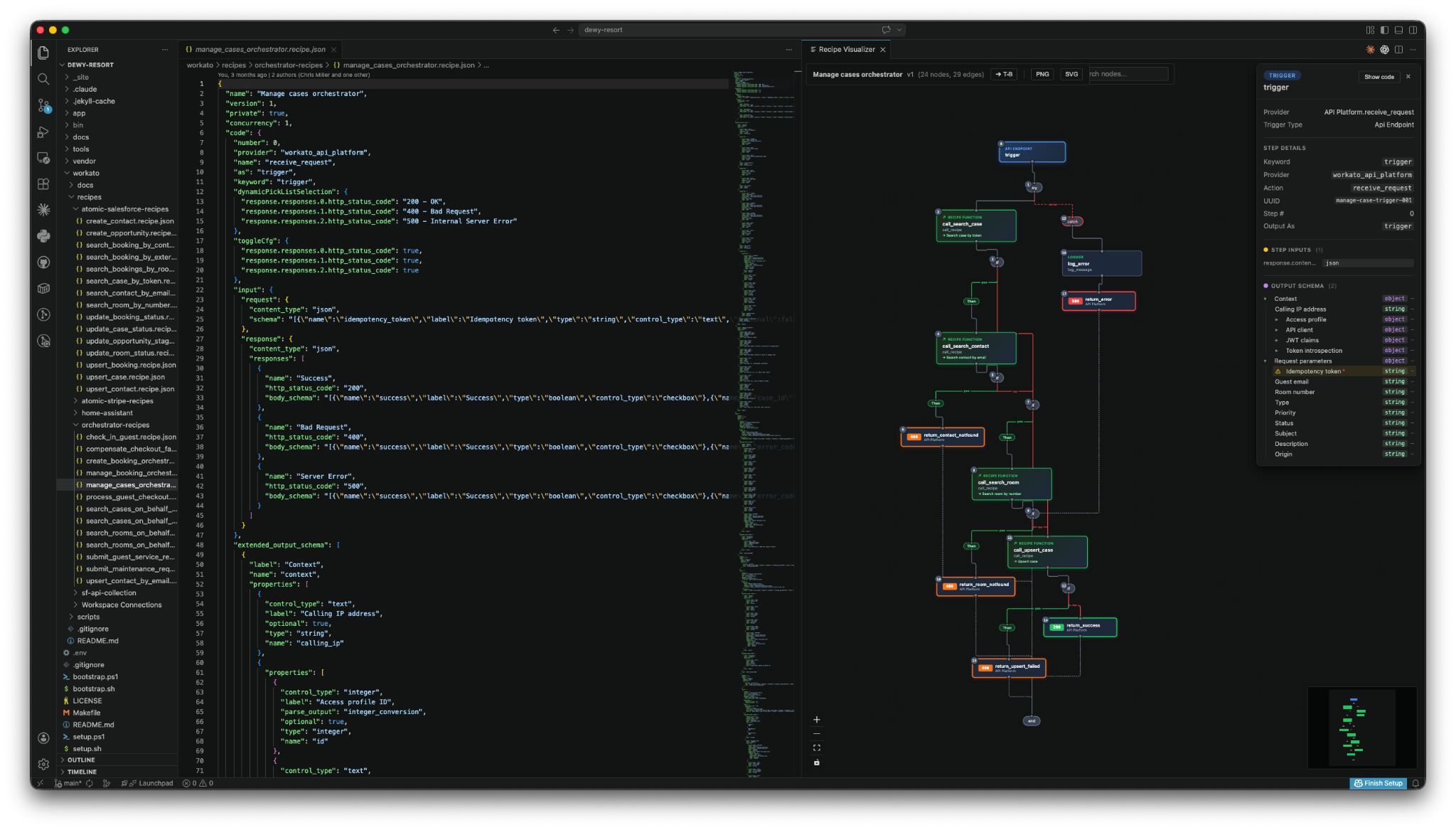
A recipe is an expression of a builder’s intent. JSON is where that intent goes to hide. (Okay, it’s actually just how the platform stores recipe metadata, but you get the point.)
The Visualizer renders a recipe as an interactive workflow graph inside your editor: click any node to jump to its source line, follow if/else, try/catch, and foreach branches as swim lanes, and drill across recipe calls. It turns a wall of nested JSON back into the thing the builder actually meant.
Built for AI, designed for developers
Workato Labs is built around a few simple principles (link: workato-devs.github.io/labs/principles.html ): agent-first, open by default, and developer experience as a first-class feature. Those principles shaped every design decision, even when it meant taking the harder path.
A CLI built for AI, not just humans
A CLI for the AI era has different requirements than one built for occasional human use. Commands, configuration, and file formats need to be predictable for both developers and AI coding assistants.
That’s why we chose TOML for wk.toml. JSON can be confused with Workato artifacts, and YAML leaves too much room for formatting errors. TOML is less common, but it’s explicit, and that matters when humans and AI are both editing the same files.
Built to be trusted
We wrote the CLI in Go as a single static binary with as few dependencies as possible. That keeps installation simple on any OS, reduces the software organizations have to trust, and minimizes the attack surface between a developer’s machine and enterprise systems.
Optimized for automation
The CLI is non-interactive by default, for now. That makes it reliable for scripts, CI pipelines, and AI agents, while still working well for developers in the terminal. Whether non-interactive-by-default is the right default, we honestly don’t know yet. That’s the kind of thing we expect to learn from how people actually use it.
From prompt to production
AI is great at generating workflows. Workato Labs provides the tools that help turn those workflows into something you can trust.
Ask your coding assistant to build an employee onboarding workflow, migrate hundreds of Workato recipes to a new workspace, or update an existing integration. Recipe Skills provide the context, Recipe Linter validates the result, Recipe Visualizer makes it easy to review, and wk CLI deploys the finished workflow, all from your editor or terminal.
This isn’t a future vision. It’s how engineering teams are already building.
“The CLI fits right into our development workflow. We can pull recipes, make changes, validate them, and deploy updates without changing how our team works. We spend less time switching tools, iterate faster, and let AI agents handle more of the implementation,” said Matt Palmer, Automation & Integration Manager at Persefoni
“The CLI felt immediately familiar to our team. As a developer, I live in the terminal,” said Todd Hayes, IT Operations Engineer at onXmaps, “This has fundamentally changed how I use the Workato platform.”
Built in the open
Workato Labs is where we experiment with new developer tools in the open. Every project is open source, and every release is shaped by developer feedback.
If you’re building with Workato, give Labs a try, star the repo, and tell us what works—and what doesn’t. Your feedback is how we’ll decide our roadmap. You can report bugs and make feature requests directly on the Github repositories.