
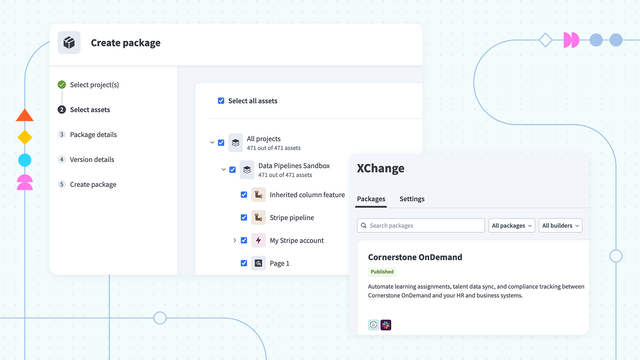
October brings Workato XChange to general availability, giving enterprises a governed way to package an asset once and distribute it to every workspace that needs it.
Platform
Workato XChange
XChange is generally available for Automation HQ and Embed workspaces on Enterprise plans and above. Builders package projects and their dependencies into versioned packages, curators review them, and the packages are distributed to one, all, or a selected set of workspaces, or published to a private community for workspaces to browse and install.
Why this matters: Once a team has built something that works – whether that’s an MCP server, an agent, an API, a connector, a data table, or a workflow – the rest of the enterprise needs it too. Without this, manual deployment across dozens or hundreds of workspaces invites version drift.
What you can do:
- Bundle projects and dependencies into versioned packages from the UI, or import a package from a zip.
- Require curator approval or rejection of each version before anything is distributed.
- Push packages to selected workspaces, or publish them to a private community for self-service install. Or, share assets via a link or zip file.
- Let tenant workspaces submit packages for review.
- Track which workspaces run which version, with audit logs, new-version indicators, and installation stats.
- Automate the full flow via API.
See every loop iteration in the job report
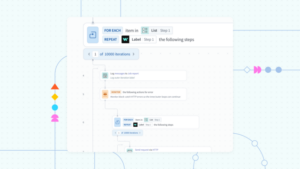
The job report now shows every iteration of a Repeat for each or Repeat while loop, with the input, output, and errors of each step inside it. A new error dropdown lists every error in a recipe run and jumps straight to the step and iteration where it happened.
Why this matters
Invoice runs, order syncs, and employee record updates process hundreds or thousands of records in a single pass, and the cost of an error depends on how fast the affected record can be found and fixed. Teams now have more visibility into which record failed, at which step, and why, without rerunning the whole job.
What you can do
- Select any iteration to see the input, output, and errors of the steps inside the loop for that pass. The item being iterated on changes with it.
- Open the error dropdown, which covers caught and uncaught errors, and go directly to the failed step and iteration. Each error card shows the time, connector, action, and a truncated message.
- Read the error path to see where it happened, for example step 4 iteration 47 → step 6 iteration 12 → step 9, or step 3 outside a loop. The path continues inward through nested loops.
- Step through each retry in a Handle error block the same way you step through loop iterations.
This feature will be rolling out to Workato’s global data centers throughout the month of November.
Enterprise MCP
MCP Ops Observability
MCP Ops Observability gives admins structured visibility into server performance, usage, and cost, through a Global MCP Dashboard and an Individual Server Dashboard.
Why this matters: As MCP servers move into broad use, admins need to answer basic questions without reading raw logs: whether a server is up, which tools are failing, who is using it, and whether service and security standards are being met.
What you can do:
- Review live status, performance, usage coverage, tool quality, adoption, SLA compliance, and security signals across all servers.
- Estimated token usage to understand the cost
- Drill into a single server for tool-level detail.
New Pre-Built MCP Servers
New pre-built MCP servers are now available, giving teams out of the box functionality across business processes.
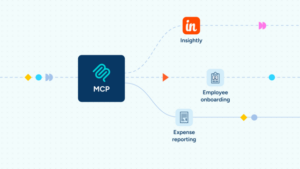
- Insightly gives agents search, get, create, and update tools across contacts, organizations, leads, and opportunities, including lead conversion.
- Employee Onboarding packages a new hire’s Day 1 kickoff as one process: find the hire, start onboarding, track status and checklists, schedule the onboarding meeting, and escalate or open a ticket when something stalls.
- Expense Reporting files or amends expense claims from chat, routed through Coupa approvals, with receipt data extraction and a confirmation step before anything is submitted.
Why this matters: Agents are only as useful as the systems and processes they can safely reach. Document libraries, CRM records, new-hire checklists, and expense claims are everyday work for employees, and each needs governed access rather than a one-off integration.
AIRO
AIRO as a Support Agent
AIRO can now answer support questions – grounded in docs.workato.com and AIRO’s troubleshooting knowledge base – and file a ticket with Workato support when it cannot resolve an issue.
Why this matters: Answering support questions accurately requires access to information that spans documentation, product tooling, and ticket queues. Triangulating all these sources can be time consuming, so having a Workato assistant that can answer with product context saves time, and can rope in Workato’s real human agents without losing the thread.
What you can do:
- Ask AIRO a how-to or troubleshooting question and get an answer drawn from documentation and product knowledge.
- Escalate to a support ticket from the same conversation, with the question, the attempted resolution, and the failure reason carried into the ticket.
Search and Enterprise Context
Larger Files in Recipe Knowledge Bases
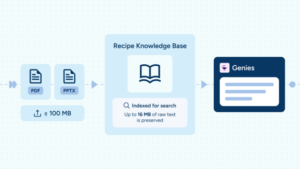
Knowledge Bases now support files up to 100 MB.
Why this matters: Reference material – including policy manuals, product catalogs, presentations and long reports – are often contained in file formats like PowerPoints and PDFs. These files are traditionally larger than our previous limit of 16MB allowed. Now, larger files of up to 100MB can be uploaded, giving businesses access to more context to inform downstream actions. After indexing, the first 16MB of raw text is preserved for retrieval.
What you can do:
- Upload large documents of up to 100MB to a Recipe Knowledge Base as a single file.
- Up to 16MB of raw text is preserved.
- Point Genies at fuller source material without pre-processing.
Security & Operations
On-Prem Agent 33.1
OPA 33.1 updates the SAP JCo libraries to 3.1.14 and trims the SAP configuration an IDoc trigger has to retrieve. It also adds PostgreSQL BIT support, fixes transactional message handling for Kafka, and updates libraries per OWASP scanner recommendations, including Spring 7.0.9.
Why this matters: SAP landscapes carry years of accumulated ALE and IDoc configuration, and one misconfigured entry should not hold up unrelated work on the same agent.
What you can do:
- Upgrade to OPA 33.1 for IDoc triggers that fetch only the ALE and IDoc configuration matching their program ID.
- Run multiple SAP subscriptions on one agent without a failed IDoc listener on one connection blocking the others.
- Read and write PostgreSQL BIT columns, and run Kafka transactional messages with the fix applied.
On-Prem Agent 34.0
OPA 34.0 adds MCP access through the on-prem agent, so agents and MCP clients can reach MCP servers that run inside a private network. It also adds partial load support for SQL Server Bulk Load and new batch handling for the Solace connector.
Why this matters: The systems agents most need to reach, such as internal databases, ERP landscapes, and line-of-business tools usually sit behind the firewall. Opening them to the internet for the sake of an AI use case is rarely acceptable, so private MCP servers need a governed path from the agent to the data. Batch-heavy integrations also depend on loads that complete predictably and on messaging that does not lose or duplicate records.
What you can do:
- Use OPA to connect agents and MCP clients to private MCP servers without exposing them publicly.
- Run SQL Server Bulk Load with partial load support, and map columns by name instead of by position.
- Process Solace messages in batches with the new Message batch trigger, and acknowledge them manually in the Receive Messages Batch action.
- Read and write SQL Server DateTimeOffset values as date-time in Run Custom SQL.
- Upgrade to pick up the SAP fix for agent failures on large batches, and the updated Java runtime and OWASP library updates.
API Platform: Shorter Authorization Tokens
Since October 20, the API Platform issues shorter authorization tokens, including OAuth2 client IDs and secrets, using URL-safe base64 encoding. Existing tokens are unchanged.
What this means for you:
- Review any validation rule on the receiving side that expects a fixed token length, and update it for newly issued or refreshed tokens.
- Create a new API client alongside the old one to roll over without interrupting live integrations.
Connectivity
New and enhanced connectors continue to ship each month. See the Platform Connectors and Community Connectors blogs for the October 2026 releases.