
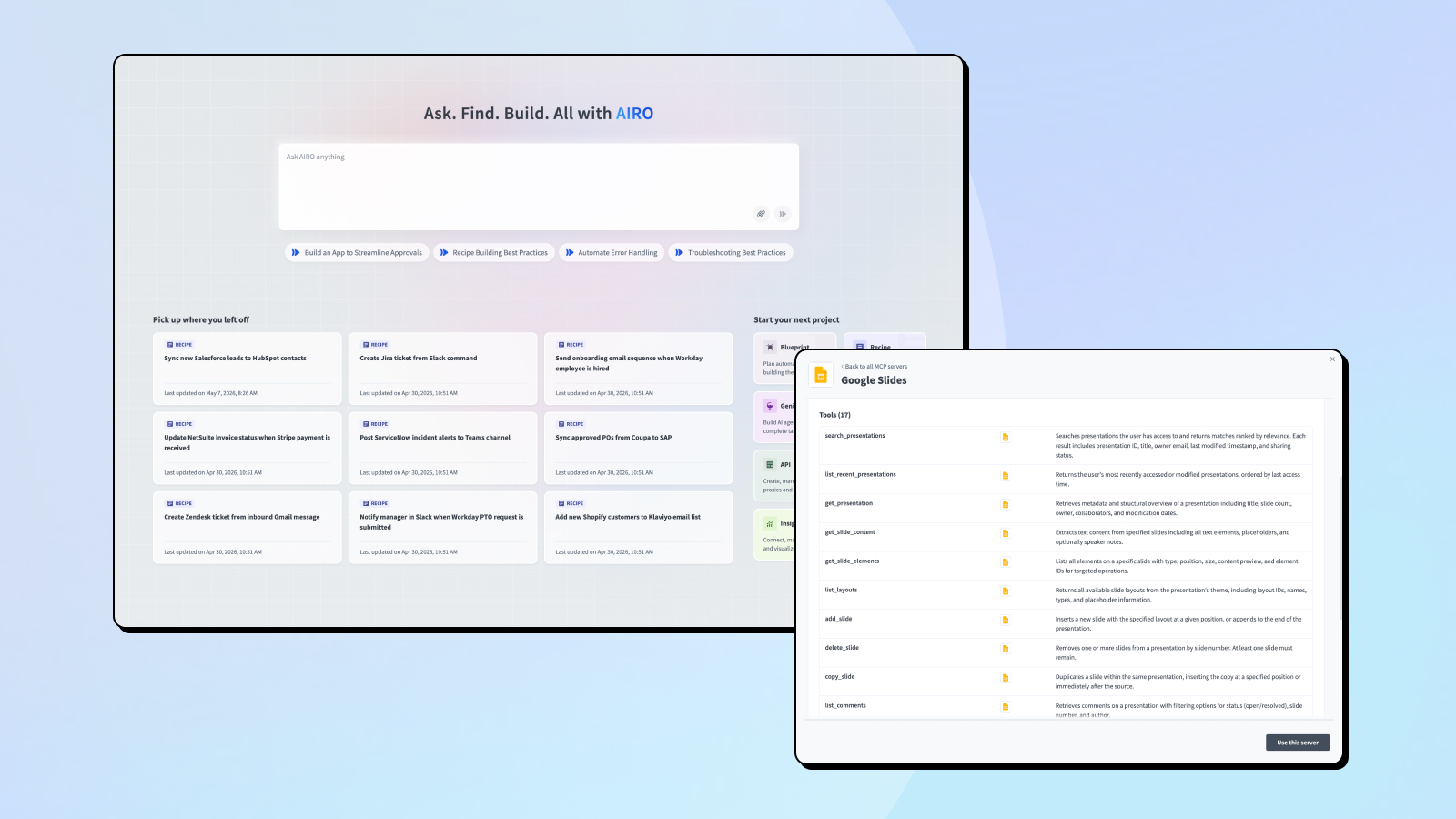
July was headlined by Workato AIRO™ going generally available worldwide, our new multi-agent experience for Workato ONE that takes builders from idea to fully built and monitored solution. We also enhanced MCP Gateway with MCP Registry for governing every MCP server, Multi-Token Auth, Tool Annotation Support, and eight new and enhanced pre-built servers. Alongside that, two new packaged Genies, IT Support Genie and EDI Genie, joined Agent Studio, which also gained a Dev API for Genie conversation data and Tool Call Stream parity on Microsoft Teams. Data Tables CSV Import is now available via the Dev API and Embedded API, and PDF Tools by Workato is now available to every customer, alongside a full slate of connector updates.
AIRO
AIRO Now Generally Available Globally
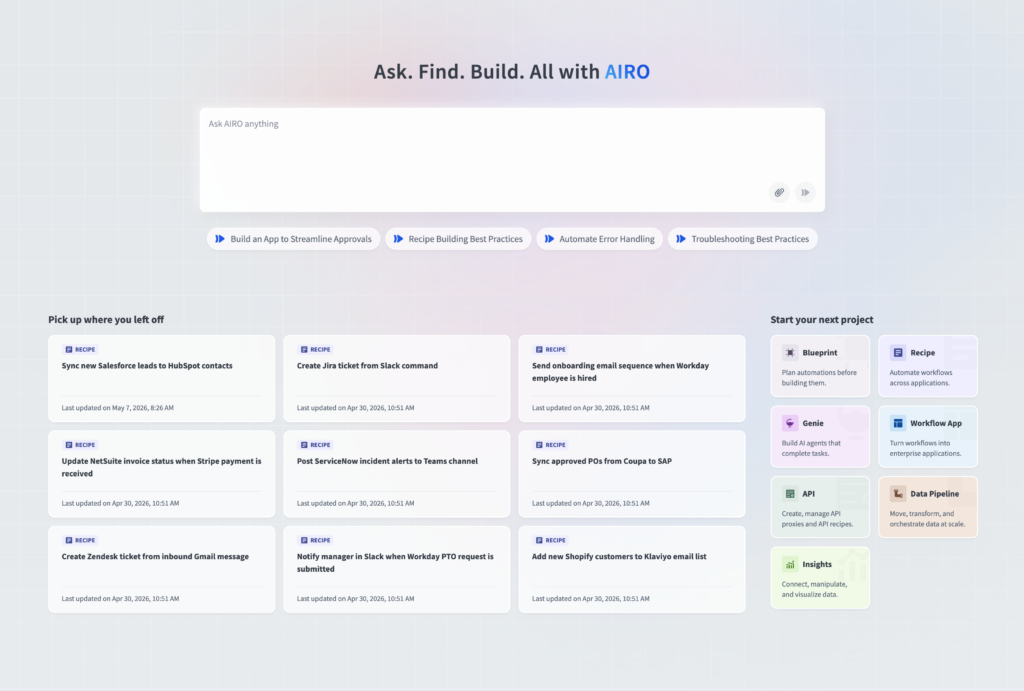
AIRO is the new agentic experience for Workato ONE — a multi-agent system that takes builders from intent to impact across the full solution lifecycle. Share an idea, and AIRO interprets the intent, generates a plan and blueprint, builds and operates the solution, then monitors and optimizes it over time — inside Workato, or directly in Claude, Cursor, ChatGPT, and the other AI tools your teams already use.
Why this matters: Instead of assembling a solution piece by piece, you describe the outcome and AIRO engineers the whole thing — architecture, build, operations, and all. And it’s not locked to one interface: work from Workato directly, or interact with the exact same AIRO from Claude Code, Cursor, or ChatGPT, so builders never have to leave the tools they’re already using.
What you can do:
- Describe a goal in plain language and let AIRO plan, architect, and build the recipes, skills, APIs, MCP servers,and other assets needed
- Get guided from idea through architecting, building, and operating with best practices, compliance, and security standards applied automatically
- Reach AIRO from the Workato homepage, side nav, or bottom nav — context follows you into projects and the recipe editor
- Connect from Claude Code, Claude Desktop, Cursor, or ChatGPT via the AIRO MCP server, with the same context and capabilities as inside Workato
- Get proactive incident detection from AIRO Acumen — ranked incidents, root-cause tracing, and plain-language answers to “why did this job fail” or “has this happened before”
MCP Gateway
Enterprise MCP Registry: A Governed System of Record for Every MCP Server
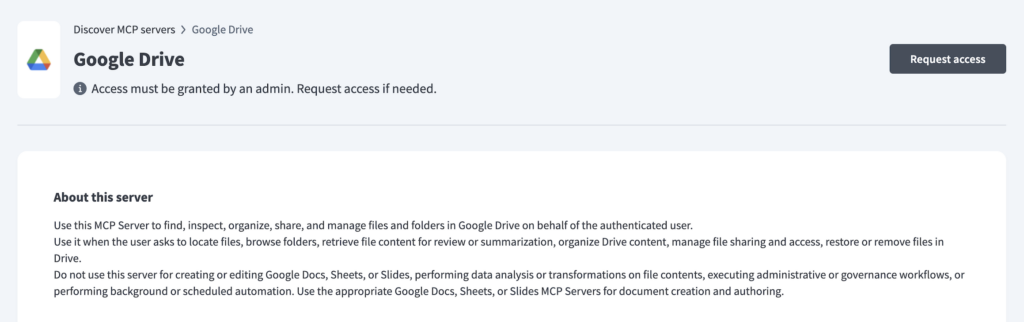
MCP Registry gives organizations a single, governed inventory of every MCP server across the enterprise, whether built by Workato, an AI vendor, a software provider, a partner, or an internal team. Builders and admins get a searchable UI showing what servers exist and their details. AI agents get the same registry exposed as a callable MCP tool, so they can discover approved tools programmatically at runtime instead of being hard coded to a fixed list.
Why this matters: As AI deployments scale, MCP server configurations tend to sprawl with no formal access control process. The Registry closes that gap. Every server moves through a managed lifecycle, from development and testing to publishing, versioning, and decommissioning, and only approved versions become visible to developers and agents. It’s one inventory that teams can discover, reuse, and extend, instead of every team standing up its own version of the same server.
What you can do:
- Browse and search the MCP servers you have access to, and see basic metadata (name, description, owner) for servers you don’t have access to yet.
- Let AI agents call search_mcp_servers(), list_tools(), and get_server_details() to discover available tools at runtime.
- Share the Registry’s standalone URL so anyone in your organization can browse server metadata without signing in.
Multi-Token Auth: Individually-Auditable Tokens for MCP Servers
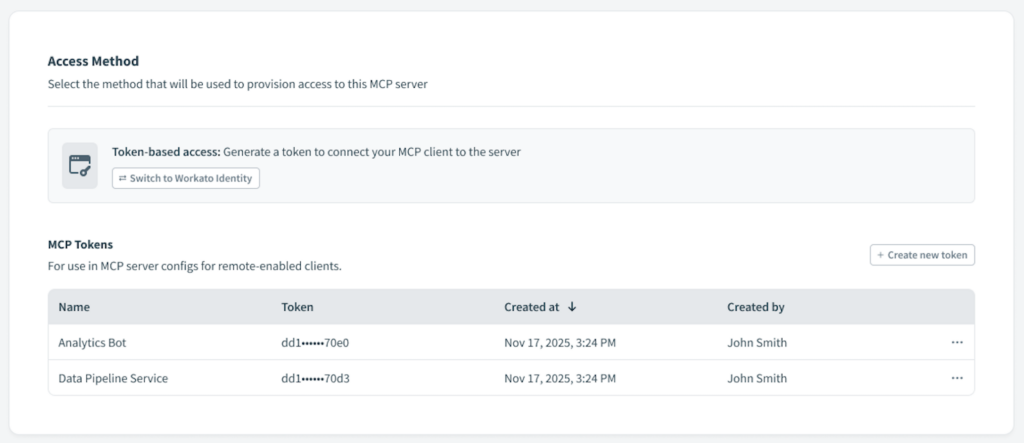
MCP servers using token auth (as opposed to Workato Identity) previously supported one active token at a time, so every user or application sharing a server shared that same credential. Multi-Token Auth lets admins issue separate, named tokens on the same server, each independently created, refreshed, deleted, and logged.
Why this matters: Named tokens give administrators per-user attribution for security and compliance reviews, and let individuals rotate their own credentials without coordinating a team-wide change.
What you can do:
- Create up to 100 named tokens per MCP server (for example, “John Smith / Claude Desktop” or “Data Pipeline / Production”), each managed independently.
- Create, refresh, and delete tokens individually, without affecting any other user’s access.
- Review per-token usage logs and audit trail entries.
Tool Annotation Support: Clearer Titles and Behavior Hints for MCP Tools
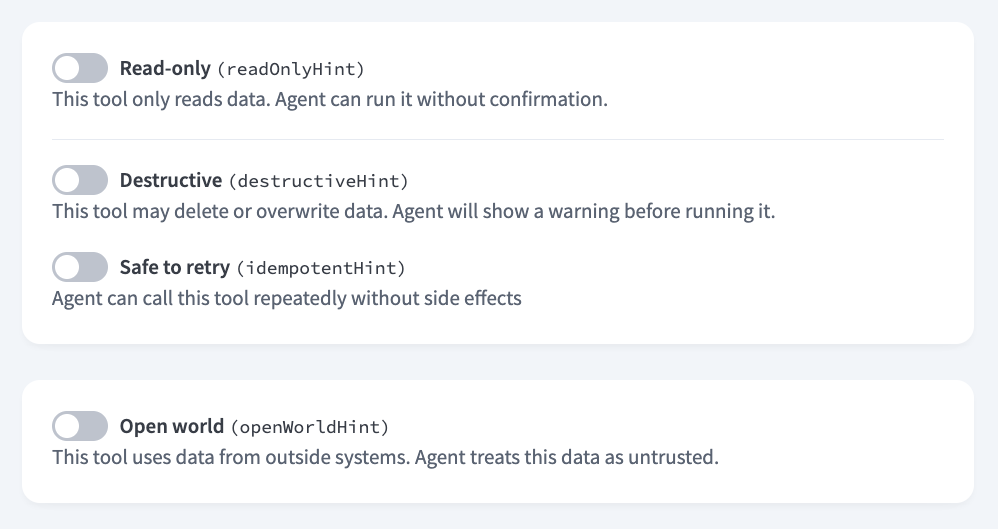
The MCP Server creation UX now separates a tool’s editable display title from its immutable, programmatic name, and adds fields for the standard MCP tool behavior annotations: destructiveHint, readonlyHint, idempotentHint, and openWorldHint.
Why this matters: Previously, Workato collapsed tool name and display label into a single field, so relabeling a tool for clarity risked breaking every client already invoking it by its old programmatic name. Behavior annotations also give security and compliance reviewers, and the AI agents themselves, a standard way to assess how a tool behaves before it’s approved or invoked.
What you can do:
- Set an optional Tool Title, distinct from the tool’s name, at any time, during creation, after activation, or in edit mode, without affecting the underlying name or existing consent grants.
- Rename the underlying recipe or skill without changing the MCP name already exposed to clients.
- Declare whether a tool performs destructive updates (destructiveHint), only reads data (readonlyHint), is safe to call repeatedly with the same arguments (idempotentHint), or interacts with an open-world domain like the public web (openWorldHint).
- Let AI agents use these hints to decide how to act, for example proceeding without confirmation on read-only tools, or pausing for approval on tools marked destructive.
New Pre-Built MCP Servers: Content, Marketing, Scheduling, and Data
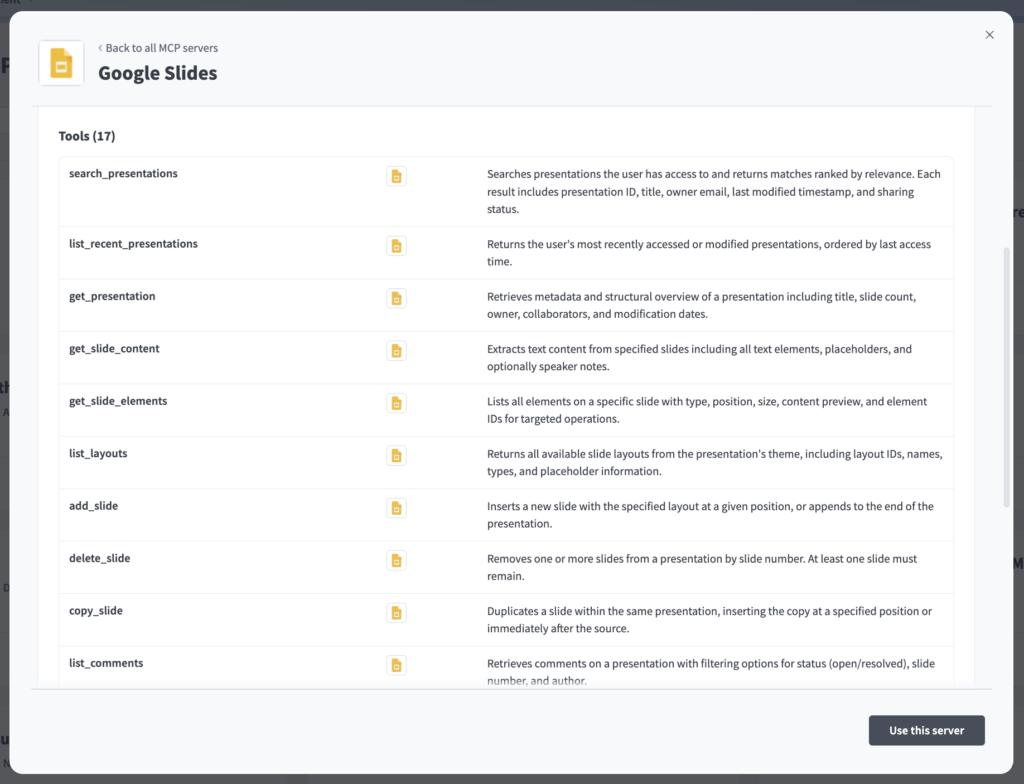
We released eight new and enhanced pre-built MCP servers this month, giving AI agents the tools to take action across more of the systems your teams use every day. These servers are accessible from the AI Hub in your Workato workspace under MCP Servers.
Why this matters: Pre-built MCP servers reduce the time to connect AI agents to enterprise systems from weeks to minutes. Each server is governed through Workato’s Verified User Access, role-based access control, and audit trails, so every action an agent takes is secure, traceable, and attributed to the person who authorized it.
Content & Productivity
- Google Slides: Search and summarize presentations, add or reorder slides, update text and speaker notes, and manage review comments.
- WordPress Content Operations: Create and update posts and pages, organize with categories and tags, manage media metadata, and moderate or reply to comments on self-hosted WordPress and WordPress.com. Schema-aware for custom post types like press releases or case studies.
Communication
- Slack (enhancement): Five new tools join the existing set: search messages and channels, pull full thread context, review channel history, and schedule messages, alongside the existing posting and lookup tools.
Marketing
- Mailchimp Campaign Management: Build and organize audiences, add and tag contacts, assemble a campaign draft, and send or schedule it. A live send always requires explicit confirmation.
- MailChimp Marketing Reports: A read-only companion to Mailchimp Campaign Management. Discover audiences, campaigns, and contacts, and report on sent-campaign performance, subscriber engagement, and audience growth and health.
- Canva (enhancement): Four new enterprise-only tools let Canva Enterprise customers discover brand templates, retrieve a template’s autofill schema, and generate a fully branded design.
Scheduling
- Calendly: Look up event types, find open slots, book or cancel a meeting on an invitee’s behalf, retrieve invitee details and intake answers, and adjust availability.
Data
- Snowflake Data Explorer: Navigate databases, schemas, and tables, inspect column definitions, sample rows, and run read-only SQL queries.
For a deeper dive into what’s new each week, check out the MCP Monday series on the Product Hub.
Agent Studio
Genie Conversations Dev API: Programmatic Access to Conversation Data
Builders can now pull Genie conversation data on demand through the Agent Studio Dev API, covering three REST endpoints to list, retrieve, and drill into any Genie’s conversations. Each response includes the full, untruncated transcript along with event-level detail such as LLM calls, tool executions, and guardrail evaluations.
Why this matters: Teams no longer need to route conversations through a workaround recipe just to capture a transcript. The API uses the same event schema as the audit log streaming API, so anything built against one payload works against the other.
What you can do:
- Retrieve full conversation transcripts and turn-by-turn detail for any Genie, programmatically
- Analyze agent performance and identify where conversations break down
- Attach chat transcripts to IT tickets for richer technician context
- Export conversation history in bulk for auditing and compliance reporting
Governed by design: access is controlled through environment-scoped Dev API tokens, per-workspace rate limiting, and workspace-admin permissioning, so transcript and event-level access stays gated to the people who should have it.
Intermediate Messages and Tool Call Streams Now on Microsoft Teams
Genies deployed on Microsoft Teams now show end users exactly what they’re doing while processing a request, matching a capability already available on Slack. Each intermediate message is paired with a real-time, collapsible Tool Call Stream that lists every action the Genie takes, in order, using human-readable labels rather than raw function names (for example, “Searching knowledge base [My KB] for [query]…”). Learn more in the documentation.
Why this matters: Users get a clear, step by step view of what the Genie is doing, and can collapse any stream to reduce clutter without interrupting it.
What you can do:
- View a persistent, collapsible Tool Call Stream alongside every intermediate message on Teams.
- See internal tool calls, like knowledge base search, file analysis, and chat history search, described in plain language.
Packaged Genies
IT Support Genie is Now Generally Available
IT Support Genie is a conversational AI assistant, built on Agent Studio, that lets employees resolve IT issues, request and manage application access, handle helpdesk tickets, and get instant answers to IT questions, all in natural language.
Why this matters: IT support teams spend a significant share of their time on repetitive requests such as password resets, access provisioning, and answering the same questions again and again. IT Support Genie deflects routine queries away from the service desk and automates the underlying actions, reducing ticket volume and speeding up resolution.
What you can do:
- Answer IT questions instantly by surfacing guidance from your organization’s knowledge base, deflecting routine queries before they become tickets
- Create, view, update, and comment on helpdesk tickets conversationally, with proactive notifications for ticket assignments
- Request and grant application access through configurable manager, second approver, and admin approval workflows
- Reset passwords and unlock accounts with full audit logging for compliance
- Create groups and distribution lists, and add or remove users, through natural language (admin only)
Governed by design: every action runs under verified identity with tool-level scope, human-in-the-loop approvals on sensitive requests, and a full audit trail — the same governance model as every Workato Genie.
Apps supported: Jira Service Desk, Confluence, Okta, Entra ID, and Google Workspace.
EDI Genie is Now Generally Available
EDI Genie is the newest Packaged Genie on Agent Studio, giving EDI operations teams a conversational way to monitor transactions, diagnose failures, analyze trading partner health, generate audit reports, and retrieve onboarding guidance, all through Workato GO, Slack, or Microsoft Teams.
Why this matters: EDI operations teams, including EDI analysts, integration managers, and compliance teams, spend significant time manually searching Orderful dashboards to investigate failures and monitor SLAs. EDI Genie replaces that manual digging with natural language search and proactive insight, reducing the time it takes to catch and resolve problems.
What you can do:
- Search and filter EDI transactions by date, trading partner, transaction type, and status using natural language
- Retrieve trading partner health insights, including success rates, latency trends, recurring errors, and SLA risk
- Generate audit ready transaction reports and receive proactive operational summaries
- Identify failed or stuck transactions, view root cause detail, and get remediation guidance
- Get step by step Orderful onboarding and configuration guidance from a curated knowledge base
Governed by design: every query and alert runs under verified identity with tool-level scope and a full audit trail — the same governance model as every Workato Genie.
Requires: an active Orderful account with API access.
Data Tables
CSV Import Now Available via Dev API and Embedded API
In May, we introduced a three step CSV import wizard (configure, preview, confirm) for creating a Data Table from a CSV file in a few clicks. This release extends that capability to the Dev API and to Embed and OEM, so builders and automated pipelines can load CSV data into Data Tables programmatically, with no UI and no record by record looping in a recipe.
Why this matters: Loading data into a table used to mean building a recipe that looped through records one at a time, slow and hard to scale. This brings append, full refresh, and fresh load operations to the API and to Embed and OEM, including a mode that replaces existing table data outright, so a pipeline can move thousands of records in a single job instead of one row at a time.
What you can do:
- Create a file upload link, push a CSV to file storage, and trigger a server side import of thousands of records in a single async job, with no looping through records in a recipe.
- Choose an import mode: append adds rows to an existing table, truncate_table clears the table before loading (the replace existing data path, gated by the existing “Truncate a data table” permission), and assert_table_empty guards clean first time loads.
- Set delimiter, quote character, encoding, and header handling when you create the upload link, so the parser reads your file exactly as intended.
- Map CSV columns to table fields by index, label, field ID, or name, with required field coverage and type compatibility checked before the import runs, and precise IMPORT_SCHEMA_ERROR messages if something doesn’t line up.
- Poll import progress, ETA, and processed record counts through the Get Data Table endpoint’s new records_import_status field, with structured error codes for table size, record count, document size, and text length limits.
- Run imports on behalf of end customers through the equivalent managed_users endpoints, for full Embed and OEM parity.
Connectivity
PDF Tools by Workato: Now Available for All
Workato can now process and generate PDF files natively, without external services or custom scripts. PDF Tools by Workato is now available to customers.
Why this matters: PDF is the standard format for invoices, contracts, offer letters, and compliance records, so most automations touch one at some point. With PDF Tools by Workato, teams can convert, stamp, merge, split, and extract text from PDFs in the same recipe as everything else, with no separate service to manage or custom script to maintain.
What you can do:
- Convert to PDF: Generate PDFs natively from Word, Excel, CSV, HTML, and image files.
- Stamp PDFs: Superimpose text or image overlays, such as invoice numbers or watermarks, onto existing PDF pages while preserving the original content.
- Merge PDFs: Combine up to 50 PDF files into a single consolidated document, ideal for contract packages, batch reports, and onboarding packets.
- Split PDFs: Break large PDF batches into individual files by page range or fixed interval, ready for downstream processing.
- Extract Text: Pull raw text from digital PDFs to feed AI summarization or LLM workflows.
Connectivity Updates: New Connectors and Enhancements
For the full list of new connectors and enhancements this month, check out the community connector and platform connector blogs in the Product Hub.
Stay Tuned for August
We hope you found this month’s updates valuable. To stay current as updates are released, visit our Changelog.