
June’s updates focus on giving builders more control over Genie knowledge and observability, extending the MCP Gateway with new capabilities, and adding usage visibility for Embed customers. With the Enterprise Context by Workato connector, builders can manage knowledge base documents directly from a recipe, and Genie Conversation Log Streaming gives security and operations teams full visibility into every Genie conversation. In Slack, For MCP Gateway, MCP Apps let any skill render interactive UIs directly inside chat conversations, and 14 new pre-built MCP servers give AI agents more systems to act on, backed by a streamlined OAuth experience for Verified User Access. Embed Partners and their End Customers get new usage and billing dashboards, and Workato Identity can now be fully branded for a seamless login experience. Read on for the details.
Agent Studio
Manage Your Knowledge Base Documents Directly from Recipes
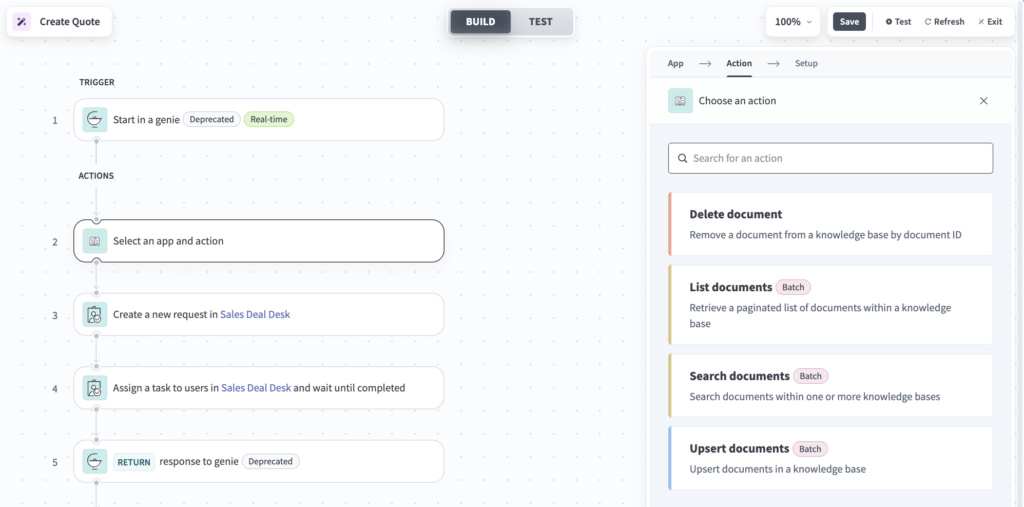
With Enterprise Context by Workato, builders can manage the documents inside a Workato knowledge base directly from a recipe. Insert, update, delete, list, and search documents programmatically, keeping the context your Genies retrieve aligned with your source systems.
What you can do:
- Upsert, delete, list, and search knowledge base documents from any recipe, regardless of source.
- Run batch upserts of up to 100 documents per call, matched by document ID, so re-runs update records in place instead of creating duplicates.
- Run natural-language or keyword search across one or more knowledge bases, with metadata, content-type, and date filters, plus paginated results.
- Get resilient batch handling: any files that fail during an upsert are reported back to the recipe.
Enterprise Context by Workato replaces the Genie connector’s Store Knowledge action. Existing recipes continue running with no action required.
Why this matters: Keeping a Genie’s knowledge current, governed, and citable used to mean stepping outside the recipe editor. Now builders can sync documents into a knowledge base from any system as part of their existing workflow.
Stream Genie Conversation Logs for Full Observability
Genie Conversation Log Streaming gives security, compliance, and operations teams a more detailed, real-time feed of everything a Genie does.
What you can do:
- Stream conversation logs to Amazon S3, Azure Monitor, or any cloud logging service you already use, including Splunk and Datadog.
- Get full conversation visibility, including every LLM call and tool call a Genie makes.
- Receive step-level events as each step completes, so the full trace is preserved even if a run fails partway through.
- Turn it on with a single checkbox: a new “Genie conversations” event type in your existing Log Streaming settings. No separate configuration is required, and your existing custom log templates and routing rules apply automatically.
Why this matters: Security and compliance teams can monitor Genie activity for anomalies on a continuous basis, analytics teams can export conversations to evaluate agent performance, and operations teams can build latency and error dashboards, all without setting up a new pipeline.
See Your Genie’s Tool Calls in Real Time on Slack
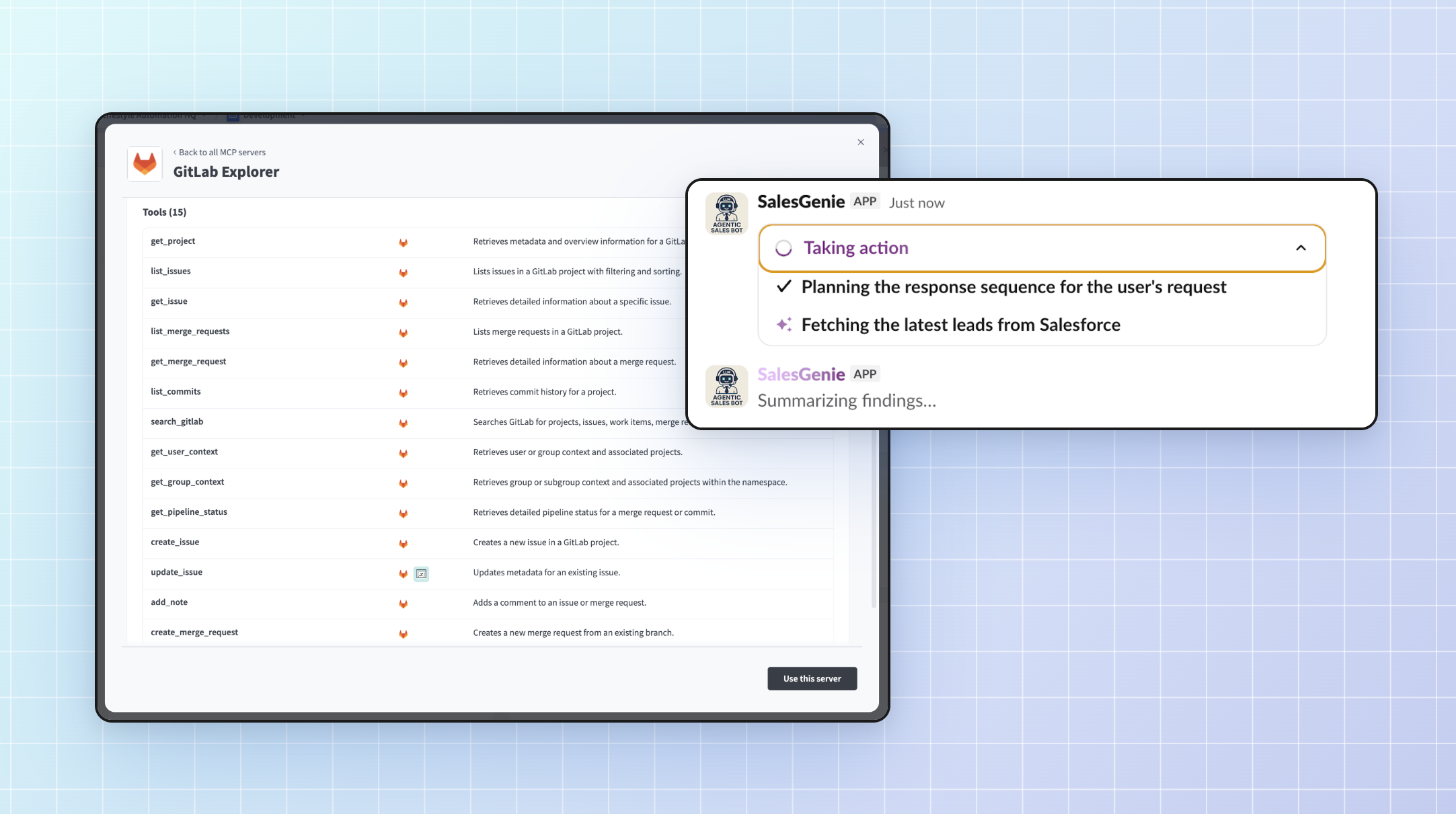
Genies can show end users exactly what they are doing, step by step, while processing a request in Slack.
What you can do:
- See each intermediate message paired with a real-time, collapsible Tool Call Stream showing the actions the Genie is taking.
- View internal tools rendered in plain language, for example “Searching knowledge base [My KB] for [query],” instead of raw function names.
- Collapse or expand any Tool Call Stream at any time.
Why this matters: End users see clear, labeled progress, which makes it easier to understand what a Genie is doing on their behalf.

MCP Gateway
Bring Rich, Interactive UI to Any Skill with MCP Apps
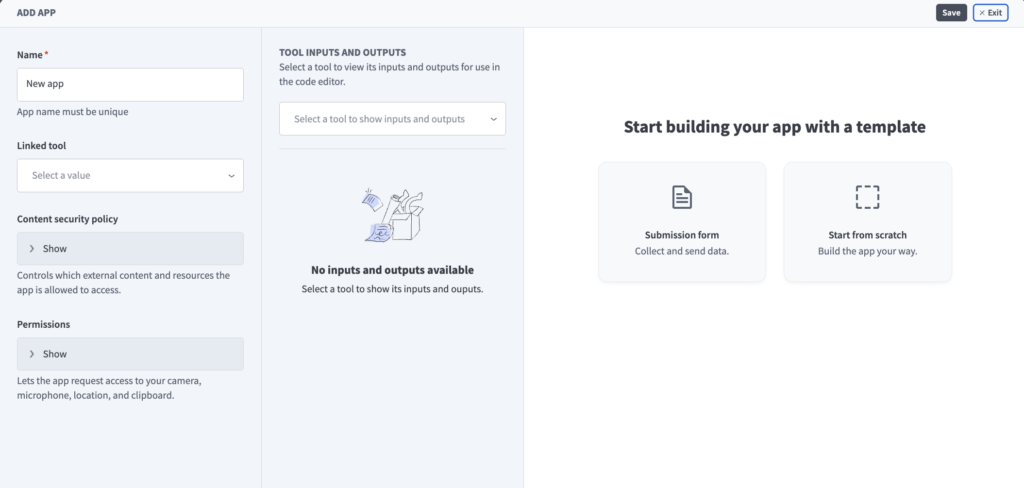
MCP Apps are now available on Workato. They are an extension of the MCP protocol that lets any skill render a rich, interactive UI, such as cards, widgets, and forms, directly inside a chat conversation.
What you can do:
- Render an interactive UI, such as cards, widgets, and forms, directly inside the conversation in Claude, ChatGPT, or any MCP client that supports MCP Apps.
- Add an app to any MCP server from Server capabilities > Apps tab > + Add App, then link it to a tool. Build the interface from scratch in the code editor, or start with the Submission form template and edit the generated code.
Why this matters: Skills no longer have to fall back on plain text responses. Builders can create experiences without pulling users out of the conversation they are already in, cutting down on the context switching.
14 New Pre-Built MCP Servers
We released 14 additional pre-built MCP servers this month, giving AI agents more systems they can take action on:
- Google Contacts: Find, create, and manage contacts, look up details, save new people, and organize groups.
- YouTube – Creator: Research content, review performance, respond to comments, and organize videos and playlists for a channel.
- Microsoft Word: Create and refine Word documents, draft new content, update existing text, and collaborate through comments and tracked changes.
- DocuSign: Create, send, and track agreements using templates, monitor signing progress, and retrieve completed documents.
- Canva: Find, organize, export, and generate designs, browse folders, upload assets, and create branded content from templates.
- ElevenLabs: Generate spoken audio from text, discover available voices, inspect voice settings, and list supported text-to-speech models.
- QuickBooks Online Billing and AR: Find, create, and send invoices, review billing status, and manage customer billing workflows.
- QuickBooks Online AP and Expenses: Find and record expenses, review spending activity, and manage expense workflows.
- Miro: Find boards, read and create sticky notes, cards, and text items, and organize work with tags and frames.
- Microsoft PowerPoint: Summarize slides, update text, add, copy, and delete slides, and generate speaker notes.
- Google Meet: Pull participants, recordings, transcripts, and Gemini smart notes from past meetings, and create or configure persistent Spaces.
- Box: Search content, browse folders, pull file text, organize with folders, and create or revoke shared links.
- Trello: Discover, filter, create, and move cards to manage tasks conversationally.
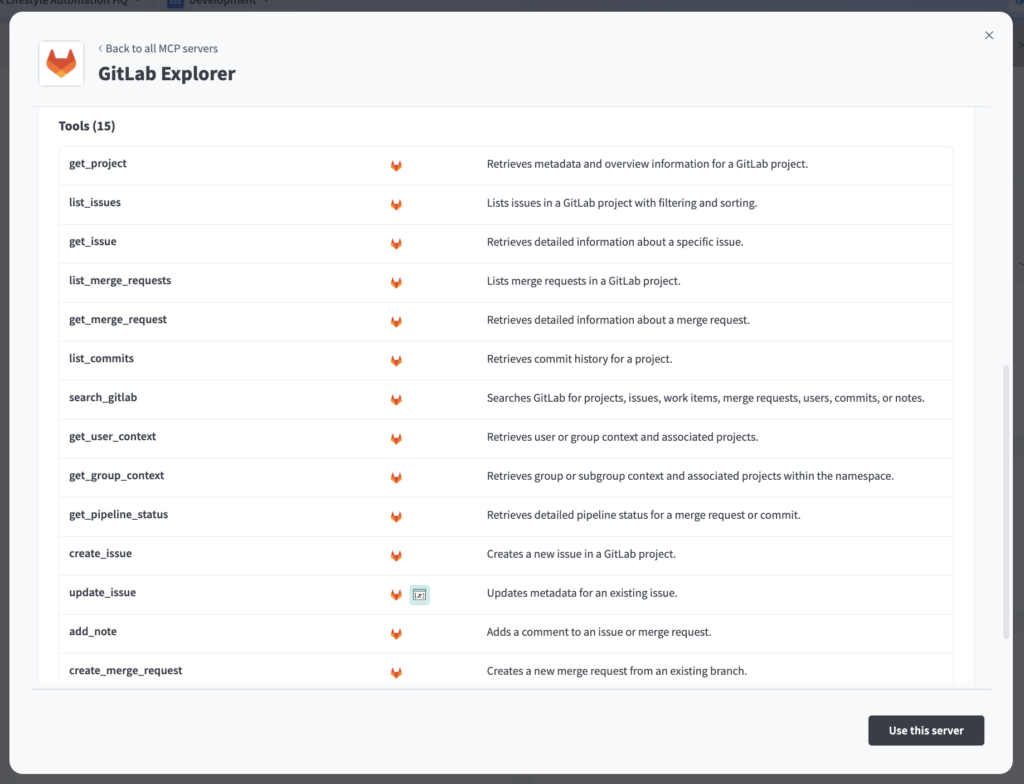
- GitLab Explorer: Read issues, merge requests, commits, and pipeline status, and create issues or open merge requests.
Access these servers from the AI Hub in your Workato workspace under MCP Servers > Create MCP Server > Start with a template.
Why this matters: Each new pre-built MCP server reduces the time to connect an AI agent to an enterprise system from weeks to minutes, while staying governed through Workato’s role-based access control and audit trails.
Streamlined OAuth Experience for Verified User Access
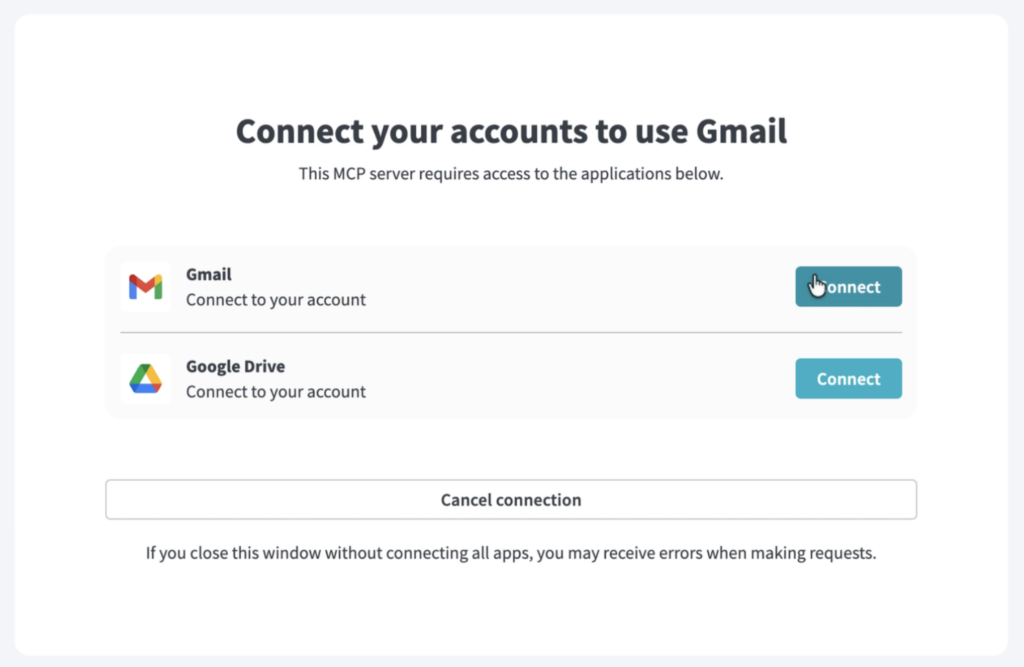
The experience for users connecting to Workato MCP servers with Verified User Access (VUA) has been enhanced. These enhancements streamline the authentication flow, cutting down on clicks and making each step clearer.
Highlights:
- Get auto-redirected straight to the third-party OAuth consent screen when an MCP server requires only one VUA connection, with no intermediate landing page.
- Have the VUA window close automatically once all required connections are established, returning you to your MCP client, for example Claude, without an extra click.
- Rely on smart auto-close logic that only triggers when a connection state actually changed, so the window stays open if you want to disconnect or switch accounts.
- Clearer error message if you deny consent or an OAuth attempt fails.
Why this matters: Enterprise users connecting to Workato MCP servers from AI clients (like Claude and Cursor) spend less time navigating authentication and more time using the tools they came for, and Genie builders publishing MCP servers that require personal credentials get a smoother onboarding experience for their end users.
Embed
New Usage & Observability Features for Embed
Embed Partners and their End Customers now have new ways to monitor usage within Workato Embed.
What you can do:
- Embed Partners get aggregate account-level reporting across their end customers plus a dedicated Customers tab for individual usage, and End Customers get a self-serve dashboard to monitor their own usage and manage billing.
- Configure custom credit limit enforcement rules per workspace. When a limit is hit, every usage-generating asset in the workspace, not only recipes, is automatically paused, and everything auto-restarts once the limit is reset or increased.
Why this matters: Embed Partners get the visibility they need to manage usage across their entire customer base, while End Customers get self-serve insight into their own usage and billing. Configurable credit limit enforcement also gives Partners tighter control over spend, protecting customers from unintended overages without requiring manual intervention.
Security & Operations
Brand Your Identity Login Experience
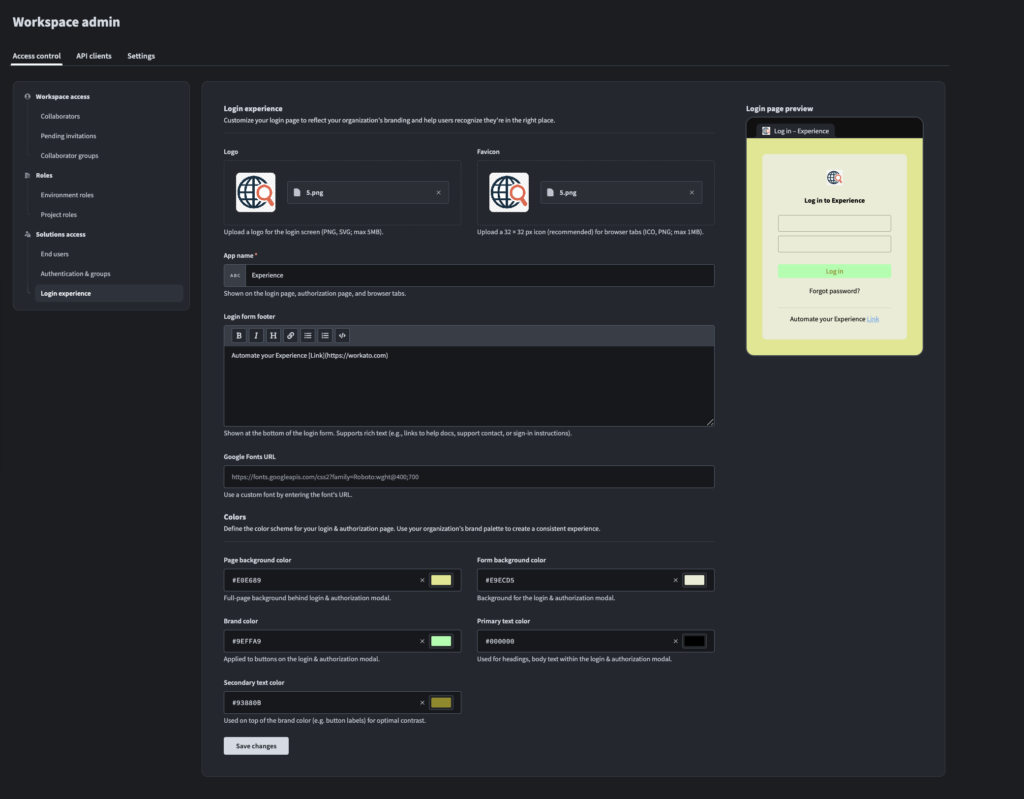
Workato Identity is now brandable, so the sign-in and connection experience can look like your product instead of a third-party tool.
What you can do:
- Upload a custom logo and favicon that render on the Identity login page, the browser tab, and the Verified User Access (VUA) connection page.
- Replace “Workato” with your own app name across the login page and browser title.
- Apply custom accent, font, and background colors across the entire login and consent flow.
- Add custom help text or subtext. For example, SSO instructions or a support contact.
- See clearer copy for MCP connections, which now reads “Connect your accounts to use [MCP Server Name],” so end users know exactly which server they’re authorizing.
Configure everything from one place: Workspace admin > Access control > Login experience.
Why this matters: Enterprises are rolling out Workato Identity as the front door for MCP servers and Genies for their employees, and customers white-labeling those experiences for their own end customers, no longer have to send users through a login flow that carries unfamiliar branding.
OPA 32.1 Released
The latest On-Prem Agent release includes IDoc processing optimization and security updates.
What’s new: OPA 32.1 optimizes IDoc processing in non-Unicode SAP systems and adds support for multibyte character encodings. It also updates security libraries in line with OWASP vulnerability scanning standards.
Connectivity
Connectivity Updates: New Connectors and Enhancements
For the full list of new connectors and enhancements this month, check out the community connector and platform connector blogs in the Product Hub.
Stay Tuned for July
We hope you found this month’s updates valuable. To stay current as updates are released, visit our Changelog.