
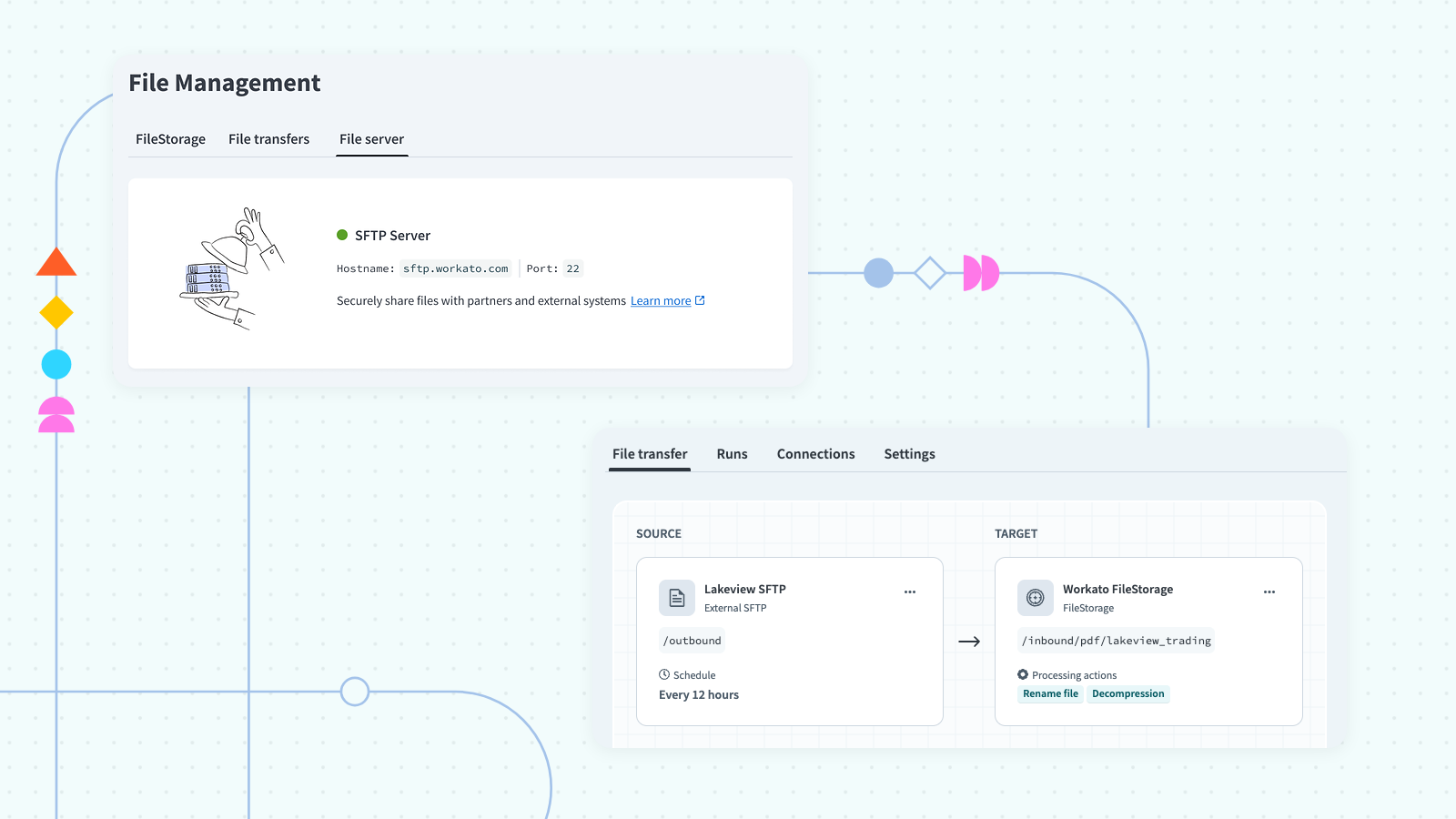
Managed File Transfer — Transfer Orchestration and SFTP Server together — is now available to all eligible customers in production.
Most teams have solved file transfer one of two ways: custom-building a file transfer flow in Workato recipes for every partner connection, or running a standalone MFT tool entirely outside the Workato automation platform. Both approaches work, until they don’t scale. A recipe-per-partner model means the same retry logic, the same error handling, and the same monitoring gaps get rebuilt dozens of times over. A standalone MFT tool handles the transfer reliably, but tells you nothing about what happens downstream, and comes with its own dashboards, its own alerting, and its own audit trail, separate from everything else your team manages in Workato.
Today, Managed File Transfer (MFT) is available in public beta to all eligible Workato customers. It brings together two capabilities: SFTP Server, a Workato-hosted endpoint where partners drop and collect files, and Transfer Orchestration, new today, which automates scheduled file transfers between Workato and external servers — with processing, retries, and a full audit trail built in, no recipe to build or maintain.
How It Works
With Transfer Orchestration, you define a source and a destination — SFTP or Workato FileStorage — and Workato handles everything in between: picking up files on a schedule, applying any processing you’ve configured, delivering them to the target, and retrying automatically if something goes wrong along the way.
What Transfer Orchestration Includes
- Scheduled, automated transfers. Run transfers on an interval or use cron expressions for more complex timing needs.
- Inline processing, no recipe required. Filter incoming files by pattern, decrypt or encrypt with PGP, and rename files — all configured directly on the transfer.
- Reliability built in. Configurable automatic retry with exponential backoff, plus auto-stop after consecutive failures, so one unreachable server or failed sign-in doesn’t fail every file behind it.
- Full operational visibility. Every run and every file gets a status, a timeline, and a file-level audit trail, viewable and exportable through Workato Logs. Configurable alerts notify your team the moment something needs attention.
- Automate around every transfer with MFTOps. Recipes can react to a failed run, a successful run, a stopped transfer, or a file that never arrived. You can also use recipes to start or stop transfers, search run history, or rerun failed files.
Because Transfer Orchestration is native to the platform, the transfer and the workflow it feeds are the same system, with one place to configure, monitor, and troubleshoot every file that moves — not a separate tool to reconcile against.
Two Pieces, One Platform
SFTP Server gives partners a place to drop files directly into Workato — files land in FileStorage, and your recipes take it from there. Transfer Orchestration handles the other side: it connects out to a partner’s SFTP server on a schedule, pulls the files in, processes them inline, and delivers them to FileStorage or back out to another endpoint entirely.
A Secure Front Door for Every Partner
Workato hosts the SFTP Server, so there’s no server to provision — partners connect with the SFTP clients they already use. Each partner gets their own user, an isolated folder, and their own credentials: a username and password or SSH keys. Admins can restrict each user by IP address, CIDR range, or country, and every sign-in, upload, download, and delete is logged.
Connected to the Rest of Your Automation
Because it’s all native to Workato, a file moving through MFT can tie directly into the rest of your automation — for example, routing through Intelligent Document Processing (IDP) mid-transfer, so a scanned invoice or an inconsistent partner file gets structured before it reaches your downstream system.
Built-In Security and Compliance
Whichever way a file moves, it’s logged through the same system — Workato Logs captures job history, per-file status, and retry attempts. Like all Workato Logs, this data is exportable, so there’s one place to check, not two. MFT also runs on the same security foundation as the rest of Workato, with audit logs retained for up to a year and file transfer job data retained 30 to 90 days depending on your plan.
What it looks like in practice
A supplier drops its nightly inventory file into its own folder on the SFTP Server. Early the next morning, a scheduled transfer finds it by filename pattern, decrypts it with PGP, and delivers it to the ERP, archiving the source file. If delivery fails, the transfer retries automatically. If it fails consecutively, the transfer then stops and alerts the team. The moment it successfully lands in FileStorage, automation takes over — ready to validate, route, or act on it.”
What’s Next
This is just the start. Transfer Orchestration will soon reach cloud storage — starting with Amazon S3, Azure Blob Storage, and SharePoint — so files can move between Workato and wherever your business already keeps them. A transfer analytics dashboard is also in the plan, showing success/error rates and performance across every transfer, so you can spot patterns without digging into individual runs.
Getting Started
Workato MFT — Transfer Orchestration and Workato SFTP — is now available to all eligible customers in production. To get started, reach out to your account team or check out the documentation.