
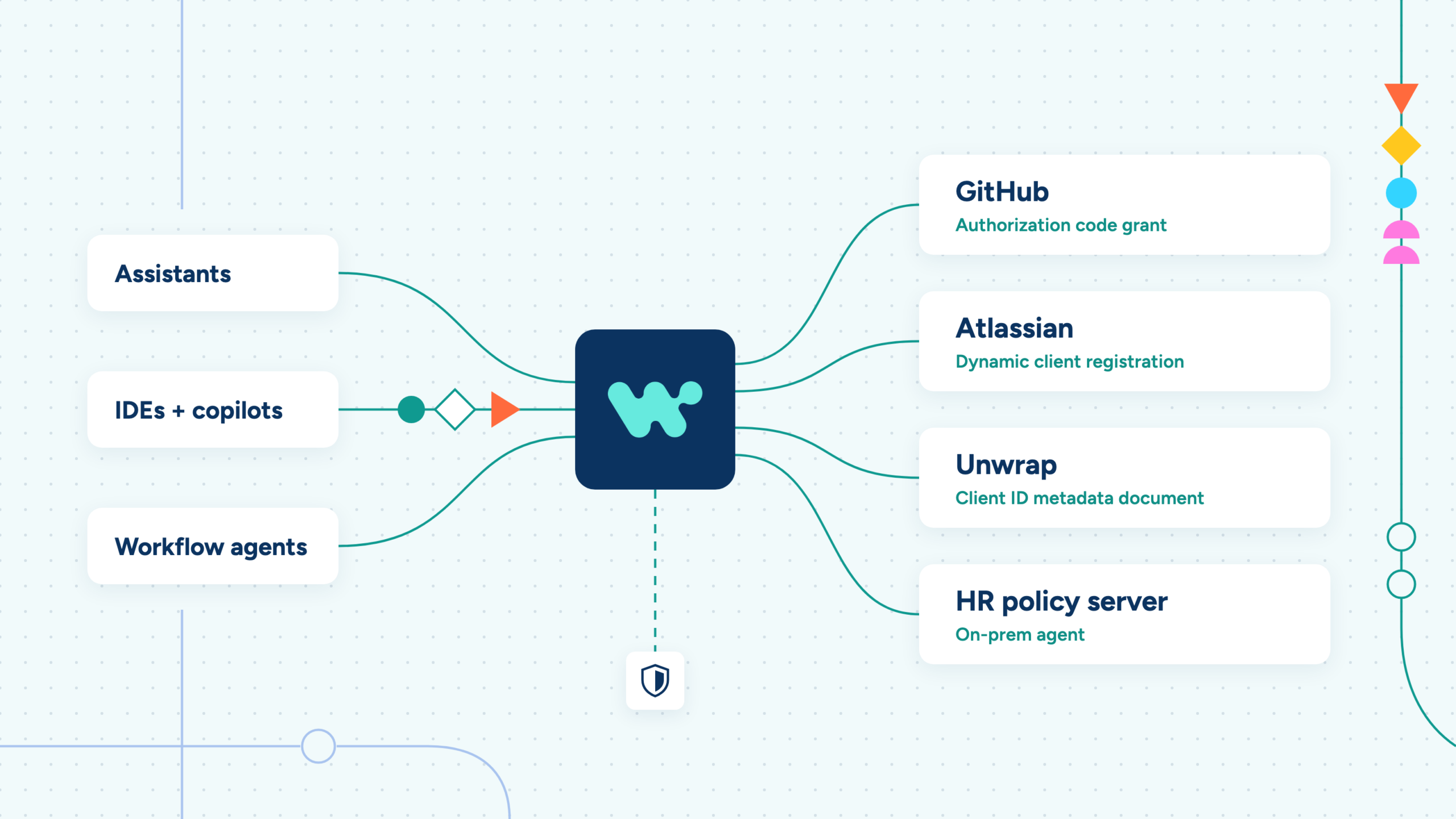
Vendors are racing to expose their products through MCP servers. For agent teams, that means more tools within reach. For platform teams, it means a new trust boundary with every connection: one vendor requires OAuth registration, another relies on user consent, and an internal server may be reachable only from inside the network.
MCP gives agents a common way to call tools. It doesn’t unify how those servers authenticate. Workato MCP Gateway can proxy third-party MCP servers through a shared governance layer, while accommodating each server’s authentication and network requirements. That lets enterprises expand the tools agents can use without forcing every upstream server into the same auth pattern.
How does the proxy handle different OAuth setups?
Some vendors require an OAuth client to be registered in advance. Others support dynamic client registration. If that isn’t available, Workato provides a Client ID Metadata Document URL for the authorization server to retrieve.
These are different ways to register the OAuth client. Workato’s proxy can accommodate the upstream server’s setup. When a connection uses end-user OAuth, each person signs in with Workato Identity and then authorizes access with their own account at the upstream service. That way, the vendor can associate the action with the person who authorized it rather than a shared builder credential. docs.workato.com
What controls can teams apply to a proxied server?
Proxying a server brings it under Workato MCP Gateway’s access controls and observability. Admins can decide which end-user groups can access a server, then use tool-level role-based access control to narrow which tools each group can call. For example, a broad group might get read access, while tools that make changes are available only to the roles that need them. Workato docs
Admins can also configure server-level guardrails such as rate limits, usage quotas, and IP restrictions. These controls are available to configure; rate limits and quotas are not enforced by default. Workato provides logs and traces so teams can review MCP activity and tool execution. Workato docs
Can the proxy reach MCP servers that stay on-prem?
Yes. Organizations may keep MCP servers inside their private network because they handle sensitive data, depend on internal systems, or need to meet internal security requirements. Workato MCP Gateway can proxy to those servers through an existing Workato on-prem agent. Calls route through the agent’s secure tunnel while the MCP server remains on-prem.
One Governed Front Door
Enterprise MCP doesn’t need every vendor or internal team to adopt the same authentication pattern. It needs a way to connect those systems while giving administrators control over who can reach each server, which tools they can use, and how activity is observed.
Workato MCP Gateway extends that control to third-party MCP servers through proxying. Each upstream keeps its authentication requirements; teams get Workato access controls, configurable guardrails, and visibility across the connections they manage.
For setup details, see Workato’s MCP server documentation.