From Finance to Field Care: Essential Automation Recipes for Modern Businesses

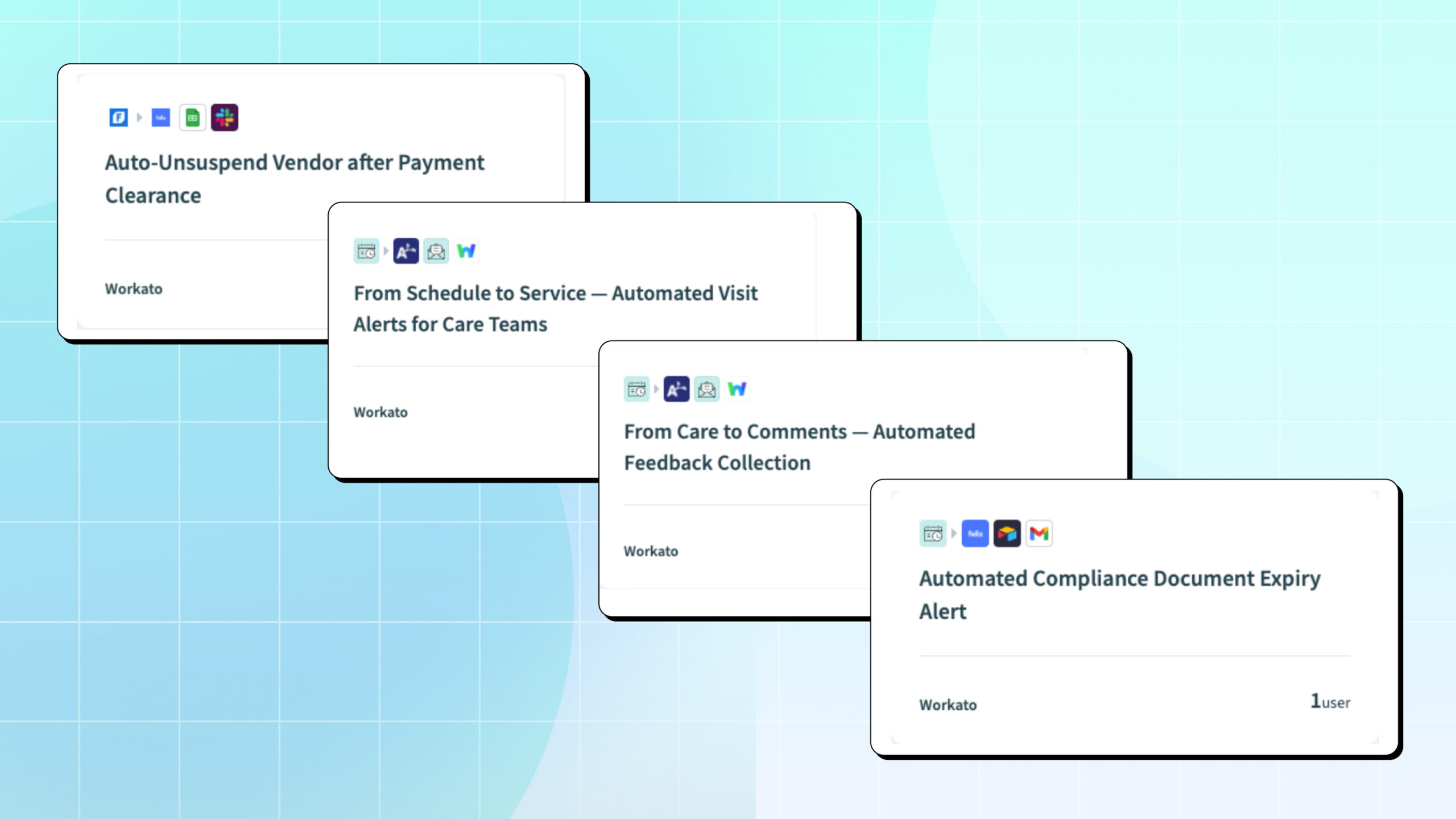
Auto-Unsuspend Vendor after Payment Clearance
This automation streamlines vendor management by automatically unsuspending vendors in Felix when a new or updated payment is recorded in FreshBooks. It ensures that vendor statuses are kept current across systems, improving operational efficiency and vendor relationships.
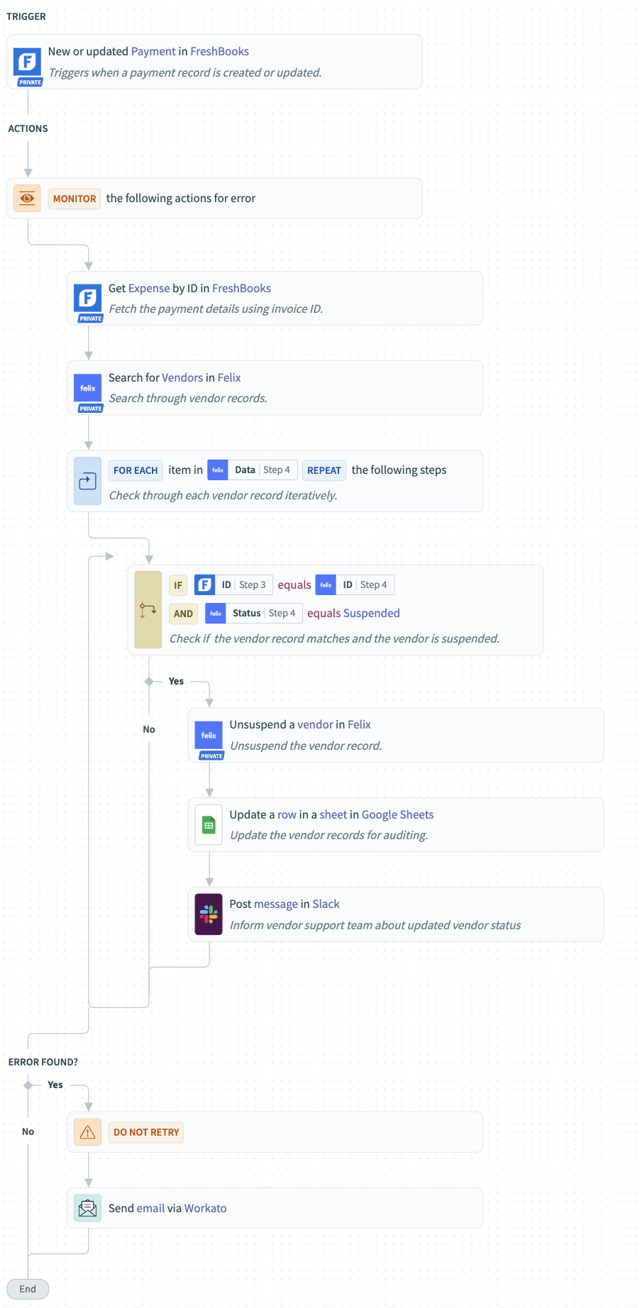
How the automation works:
The automation is triggered whenever a new or updated payment is made in FreshBooks. It then retrieves the details of the expense associated with this payment from FreshBooks. Next, it searches for corresponding vendor records in Felix. For each vendor record found, the recipe checks if the vendor’s User ID matches the payment details and if their status in Felix is currently “Suspended”. If both conditions are met, the vendor’s status in Felix is automatically updated from “Suspended” to “Unsuspended”. Following this, the vendor’s record is updated in a Google Sheet for auditing purposes, and a message is posted in Slack to inform the vendor support team about the updated vendor status.
Why this automation is impactful:
This automation significantly reduces the manual effort involved in managing vendor statuses, especially for businesses with a high volume of payments. By automatically unsuspending vendors upon payment, it ensures that vendors can continue their operations without unnecessary delays, fostering better relationships. It also maintains accurate and synchronized vendor data across FreshBooks, Felix, and Google Sheets, providing a clear audit trail and improving overall data integrity. The Slack notifications keep the support team informed in real-time, allowing them to focus on more complex issues rather than routine status updates.
Start building in Workato
Feel free to check out the recipe here for a ready-to-use version that you can easily duplicate and implement.
Automated Compliance Document Expiry Alert
This automation streamlines vendor compliance management by integrating Felix, Airtable, and Gmail. It automatically monitors vendor compliance documents for upcoming expirations and proactively notifies vendors, ensuring timely renewals and maintaining compliance.
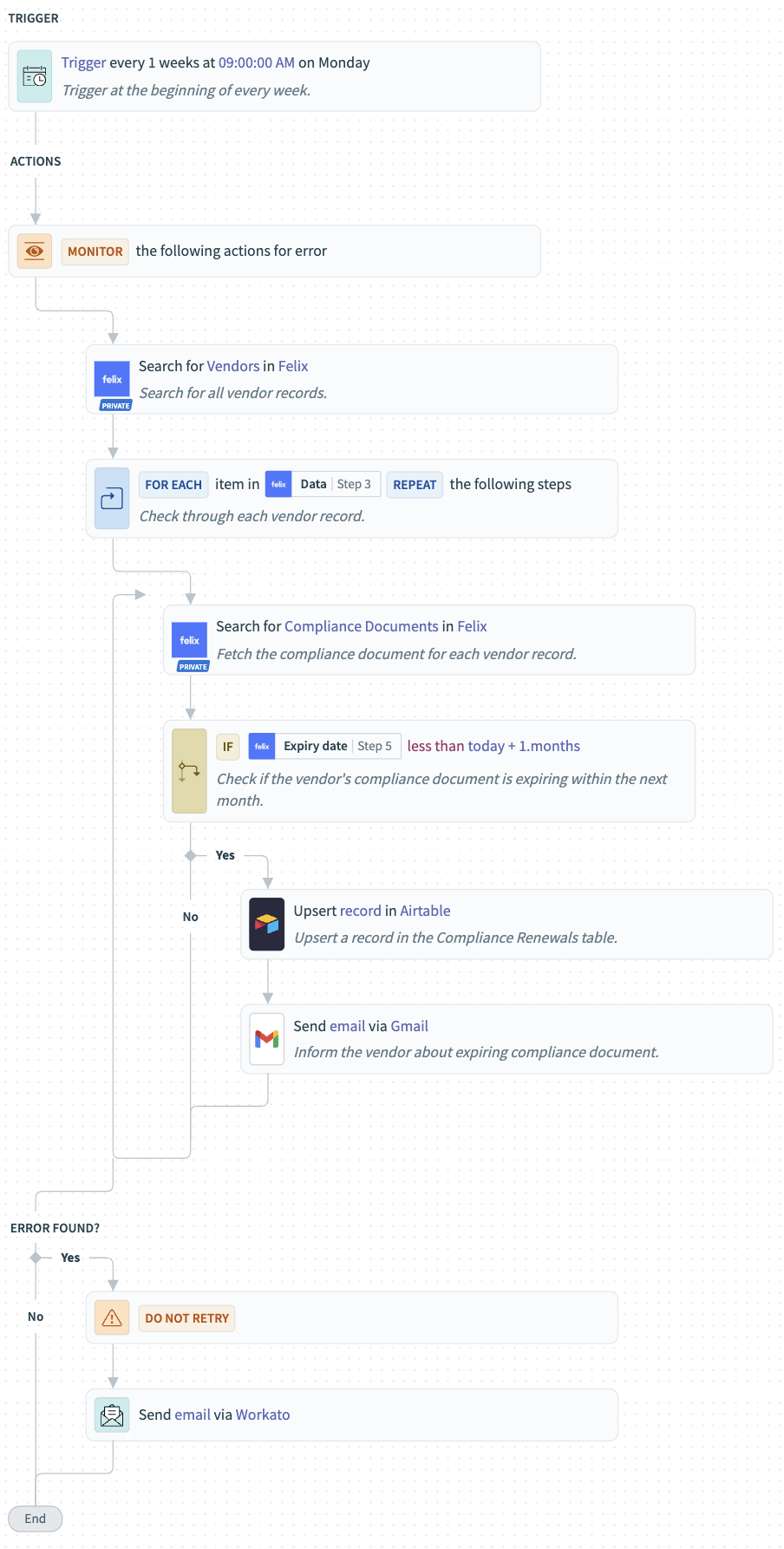
How the automation works:
The recipe is triggered every Monday at 9:00 AM. It begins by searching for all vendor records in Felix. For each vendor found, the automation then searches Felix for their associated compliance document. A conditional check is performed to determine if any compliance document is expiring within the next month. If a document is found to be expiring soon, the recipe creates or updates a record in the “Compliance Renewals” table in Airtable. Following this, an email is automatically sent via Gmail to the respective vendor, informing them about the expiring compliance document.
Why is this automation impactful:
This automation significantly reduces the manual effort involved in tracking vendor compliance and sending renewal reminders. By proactively identifying expiring documents and automating notifications, it helps organizations maintain continuous compliance, avoid potential penalties, and strengthen vendor relationships. The centralized tracking in Airtable provides a clear overview of all compliance renewal statuses, ensuring no critical document renewal is missed.
Start building in Workato
Feel free to check out the recipe here for a ready-to-use version that you can easily duplicate and implement.
From Schedule to Service — Automated Visit Alerts for Care Teams
This automation ensures care employees never miss their scheduled visits by sending timely reminders directly from AlayaCare. It streamlines communication and keeps staff informed about their upcoming service appointments.
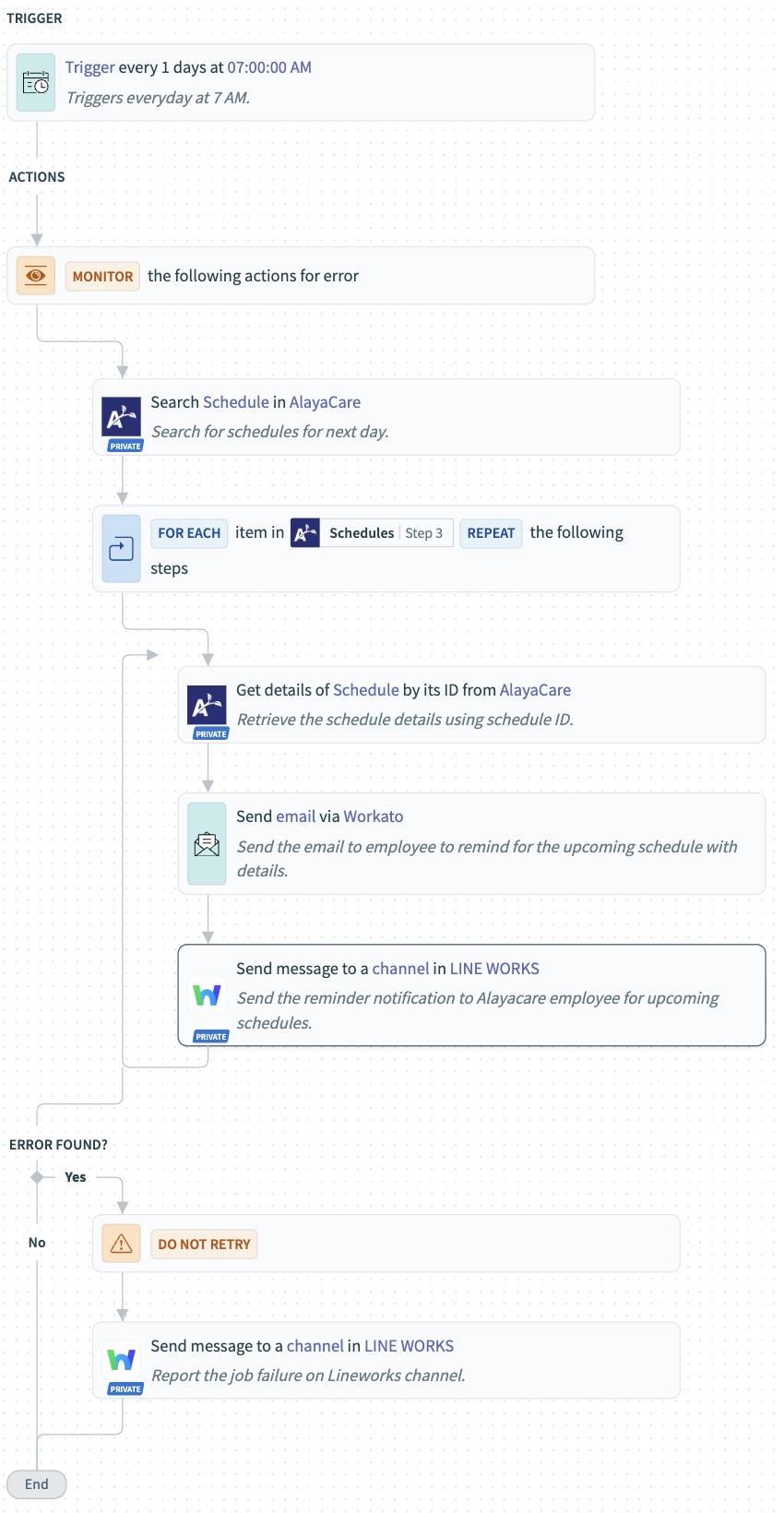
How the automation works:
Every morning at 7:00 AM, the recipe scans AlayaCare for all scheduled visits in the next two days that are confirmed (not vacant, on hold, or canceled). For each visit, it gathers details such as the service type, client name, and visit timing. An email reminder is then sent to the assigned employee with all relevant visit information, followed by a LINE WORKS message containing the same details. If any errors occur during execution, the system automatically sends an alert to a designated LINE WORKS channel with the job name, error message, and troubleshooting link.
Why is this automation impactful:
This automation eliminates missed visits and communication delays by proactively notifying employees about their upcoming assignments. It improves operational reliability, ensures timely care delivery, and enhances coordination between care teams and clients — all while providing real-time error visibility for smoother operations.
Start building in Workato
Feel free to check out the recipe here for a ready-to-use version that you can easily duplicate and implement.
From Care to Comments — Automated Feedback Collection
This automation ensures clients receive timely feedback reminders after their AlayaCare services. It helps maintain consistent client engagement and improves service quality through structured feedback collection.
How the automation works:
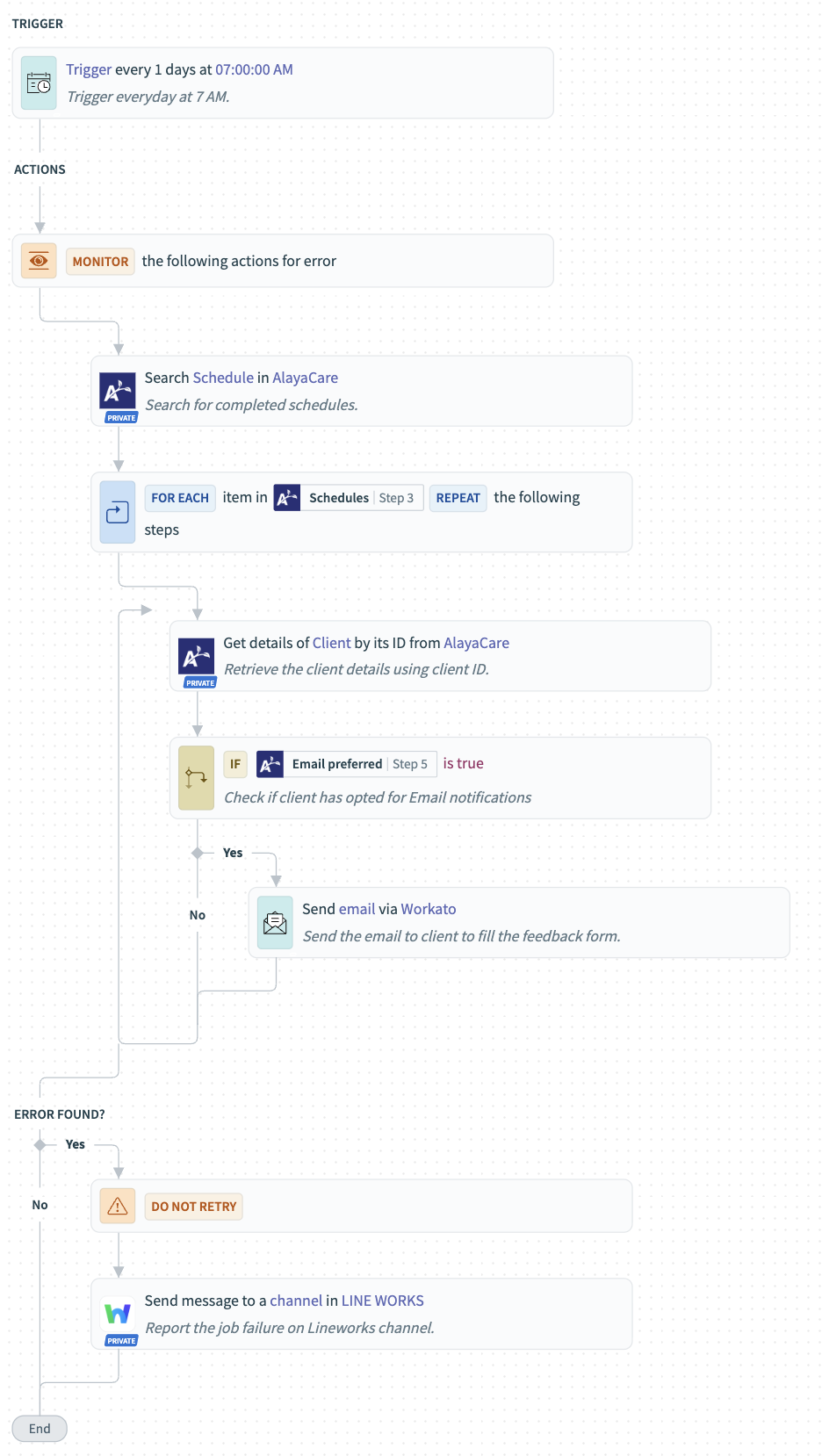
The recipe runs automatically every day at 7:00 AM and scans for completed schedules from the past two days in AlayaCare. For each completed service, it fetches the associated client details and checks if a preferred email address exists. If available, the system sends a personalized email reminder asking the client to share their feedback through a form. In case any step fails—such as missing data or API errors—the automation instantly sends an error notification to a designated LINE WORKS channel with details of the failure.
Why is this automation impactful:
By automating the feedback process, this recipe eliminates the need for manual follow-ups and ensures no client is missed. It helps organizations collect valuable insights from clients efficiently, track service satisfaction trends, and take proactive steps to enhance overall client experience—all while maintaining full visibility into any operational errors.
Start building in Workato
Feel free to check out the recipe here for a ready-to-use version that you can easily duplicate and implement.