
Your company just rolled out an AI agent connected to Salesforce, Jira, and Google Docs via MCP. Which is exciting, until you realize the agent is running on a shared API token. Which means every employee now has access to every record, every deal, and every document in those systems. The intern can see the Sales VPs pipeline. The contractor can pull HR files.
You didn’t mean for that to happen. But that’s exactly how token-based MCP access works by default.
The alternatives aren’t much better: spin up separate MCP servers for every user role, or build bespoke API integrations per team. Neither scales. Neither is sustainable.
Introducing Verified User Access
Verified User Access (VUA) solves this by making your AI agent operate as the person using it, not as an all-access service account.
With VUA on Workato, every person who interacts with an MCP-connected agent authenticates with their own credentials, the same ones they already use to log into Jira, Salesforce, or any OAuth 2.0-compatible app. Under the hood, VUA leverages Workato’s runtime user connections so the agent is scoped strictly to that user’s permissions. If your Jira admin says you can only see Project Alpha, that’s all the agent sees too.
Here’s what makes it different:
- One MCP server for everyone. VUA lets you combine Recipe Functions and API Recipes into a single, unified MCP server that serves all your teams, no per-role infrastructure required.
- Authenticate once, done. Once a user authorizes, their credentials are securely stored and reused across every tool in that server, so they authenticate once and never get prompted again. If your server connects to multiple apps, users simply authorize each one in sequence: one flow, multiple apps, zero ongoing friction.
- Full user-level audit trail. Because every session is tied to an individual identity, you get complete visibility into who did what, and when.
Setting it up takes two steps:
- In your MCP Server settings, go to End User Access, choose Workato Identity, and grant access to the right user groups via OAuth 2.0.

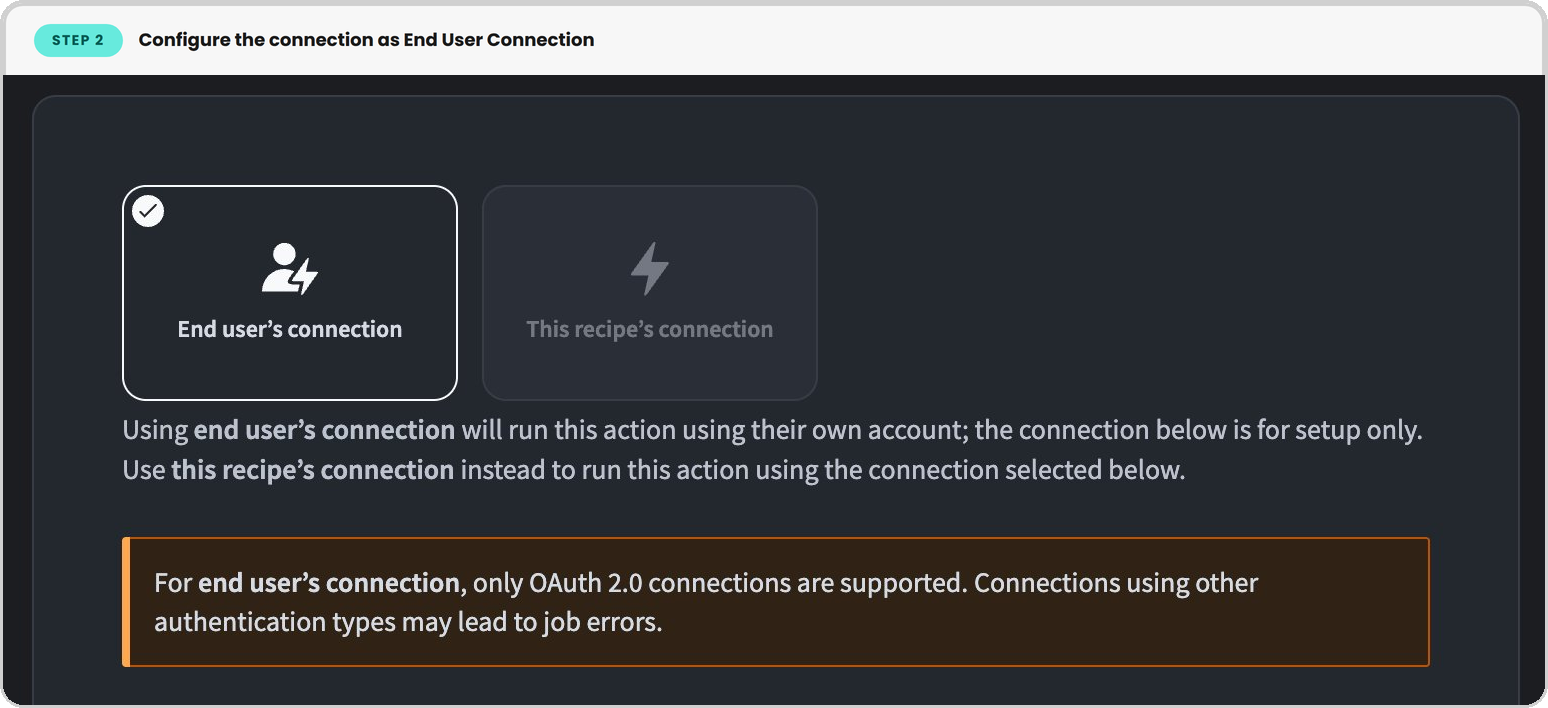
- Then, in each tool (a Workato recipe), configure the connection as an End User Connection. That’s it.
See it in action: Jira
Say you’ve built an MCP server that lets your team manage Jira issues through Claude. When a user connects for the first time, they’re prompted to verify their identity via Workato Identity, then redirected to Atlassian’s OAuth consent screen to authorize with their own Jira credentials. Workato securely stores that connection, so the next time they return, they go straight in.
From that point on, everything they do through Claude, viewing issues, updating statuses, adding comments, is scoped to their Jira permissions. A developer on Team A sees Team A’s board. A project manager with cross-project access sees more. If the MCP server also includes Salesforce tools, the user authorizes Salesforce in the same session. One flow, multiple apps.
Nobody accidentally stumbles into a restricted project, because the agent is operating as them, not as an all-access service account.
Lock down your agents without slowing your team down
Enterprise-grade security and effortless AI adoption don’t have to be at odds. Spin up a Workato trial, build your first VUA-enabled MCP server, and see for yourself.
Start your free trial today.