
Modern threat detection is fast. Platforms can flag a malicious process inside a container the instant it spawns. However, response still tends to depend on a person seeing the alert and acting on it.
The recently released pre-built Upwind connector speeds up the response. With it in place, Upwind’s runtime telemetry can flow directly into the applications your teams use: Slack, Jira, ServiceNow, PagerDuty, your SIEM, or wherever else your workflows live.
What is Upwind?
Upwind is a runtime-first AI and Cloud-Native Application Protection Platform (CNAPP) that unifies application security, security posture, and real-time protection on a single platform, giving teams the visibility, runtime context, and enforcement they need to reduce risk from development through production. When a security engineer opens an Upwind alert, the affected resource and the runtime behavior that triggered it are in a single view. That context is what makes Upwind events useful as workflow triggers.
Workato handles the orchestration details (who needs to know, what should be cut off, where the ticket goes, who owns the resource) while enriching alerts with business and ownership context, correlating signals across systems, and executing adaptive, policy-driven response playbooks.
That covers automated containment across cloud, Kubernetes, and identity layers; human-in-the-loop approvals via collaboration tools; bi-directional sync with ticketing systems; and post-incident workflows for remediation, reporting, and continuous improvement. Every Upwind alert becomes a precise, scalable, and auditable response.
A worked example
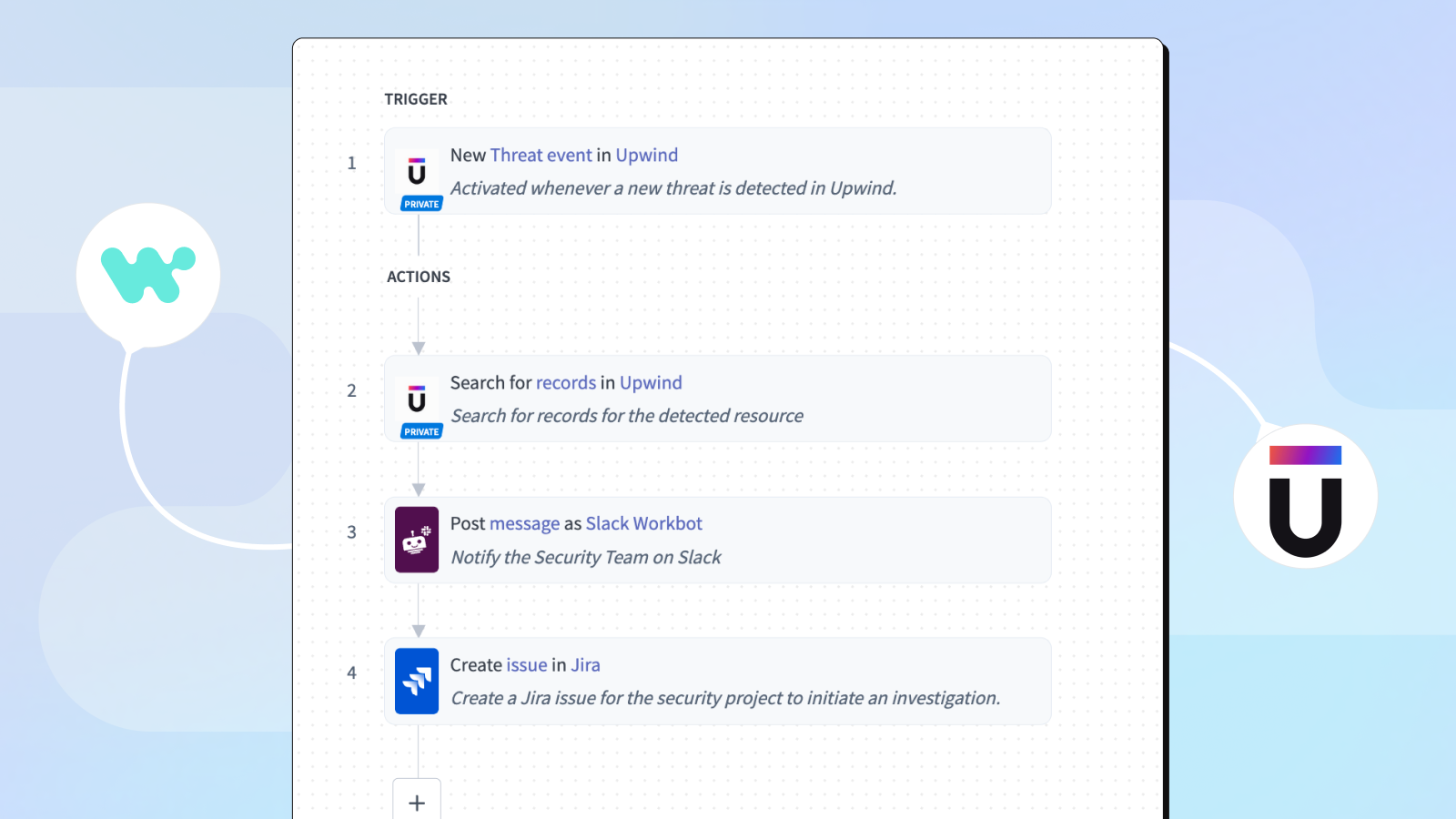
The recipe below shows how quickly the connector turns an event into a fully routed investigation.
The trigger is a new threat event in Upwind. The recipe activates the moment Upwind detects something worth flagging: an unexpected process making outbound calls from a production pod, or a workload suddenly touching a secret manager it’s never touched before. The recipe pulls additional context on the affected resource: which cluster it lives in, who deployed it, what other findings are linked to it, and what the recent runtime behavior looks like.
From there, the recipe fans out. The security team gets a structured Slack message via Workbot containing severity, resource, runtime context, and inline action buttons that let them act without leaving Slack. At the same time, a Jira ticket opens in the security project with the same context, automatically assigned, labeled by severity, and linked back to the original Upwind finding, so the investigation has a paper trail.

The connector itself comes with the building blocks behind that recipe: triggers for new records and new-or-updated records (where “record” can be a threat event, finding, asset, policy violation, or any other object Upwind exposes), and actions to search, get, create, and update those records.
Beyond the starter recipe
Once Upwind events are flowing through Workato, the surface area widens quickly.
- Branch on a finding to pull the owning team from ServiceNow, the commit from GitHub, and the on-call from PagerDuty, so by the time a human looks at the ticket, the “who owns this?” question is already answered.
- Route by severity and environment, sending critical-severity threats in production to a channel and quietly sending low-severity dev findings into a weekly digest.
- Pair the trigger with downstream actions gated behind a Slack approval.
- Capture every finding and every response action in an audit log that lands in your SIEM or data warehouse for compliance evidence.
- Or wire the whole thing into a Workato Genie that triages incoming findings and drafts the initial Jira description, with human-in-the-loop approvals for the judgment calls.
Workflows that would take weeks or months to build from scratch take minutes to days to deploy with Workato.
Getting started
The Upwind connector is available now, with SOC 2 Type II, HIPAA, and GDPR compliance and role-based access controls. For more ambitious workflows like adaptive routing, closed-loop remediation, or agentic triage, talk to your account team.