
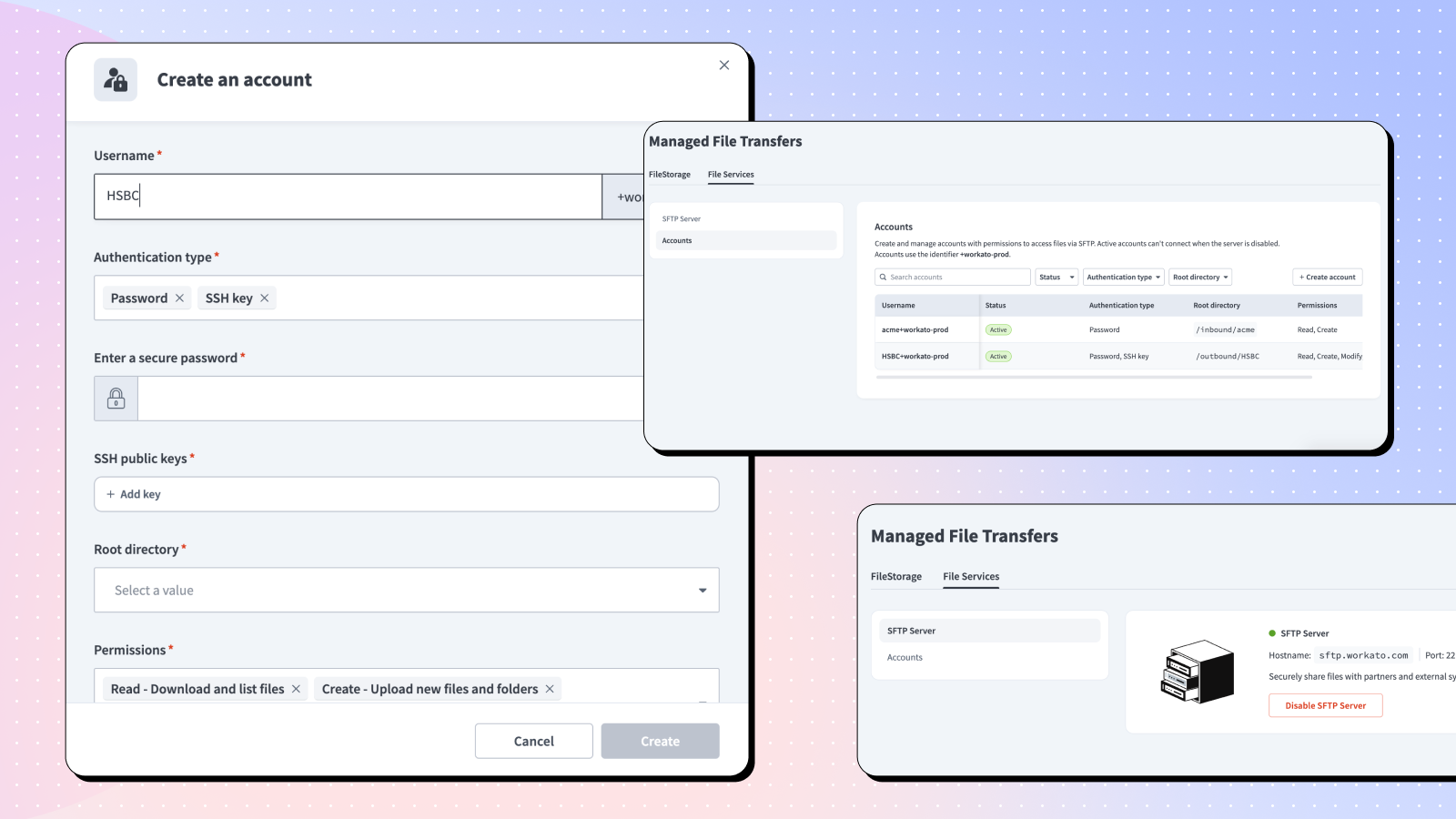
Workato-hosted SFTP now available. No extra tools. Just seamless, secure file transfers.
For all the progress made in integration, file-based workflows remain a foundational part of how businesses operate. Banks send payment files, suppliers drop inventory updates, and healthcare systems exchange records as files. They do all this using SFTP, one of the oldest and most widely used file transfer protocols.
Until now, file transfer has meant juggling separate tools: a standalone SFTP server here, a dedicated MFT product there, and manual hand-offs in between. Inevitably, that approach creates silos, introduces operational risk, and breaks the end-to-end visibility your teams need.
Now, Workato SFTP changes that, bringing secure, governed file transfer into the same environment where you orchestrate workflows and operationalize AI. In doing so, it marks the first step in Workato’s MFT vision: one platform where file transfer, orchestration, and AI work together for end-to-end visibility and better governance.
How It Works
With Workato SFTP, files arrive, Workato stores them in FileStorage, and they immediately trigger workflows or push processed files back for partners or systems to collect.
All within Workato’s security boundary, Workato-hosted SFTP provides audit trails from arrival to delivery.
What the Workato SFTP Server Includes
- A hosted endpoint your partners can connect to directly. There’s no server to provision and no infrastructure to maintain. Instead, partners connect directly to the Workato-hosted endpoint for secure B2B file exchange.
- Automatic workflow triggers on file arrival. When a file lands via SFTP, it can immediately trigger a downstream recipe.
- Workato monitors every file operation. Workato automatically captures every authentication event, upload, download, rename, and delete in logs.
- Granular access controls. You can configure permissions at the root directory level, and IP allowlisting lets you restrict which sources can connect.
How Workato SFTP Differs from a Standalone SFTP Tools
Most self-maintained servers or standalone SFTP tools solve one problem well: moving files securely from point A to point B. What they don’t do is tell you what happened after: whether records loaded cleanly, exceptions were flagged, or downstream systems got what they needed. The file transfer and the workflow that depends on it live in different systems. That means separate monitoring, separate alerting, and a visibility gap where you need it most.
Fortunately, Workato SFTP closes that gap. Specifically, because file transfer is native to the platform, the moment a file lands is the same moment your workflow begins. As a result, you get a single audit trail that spans intake, processing, and delivery, without stitching together logs from two different tools.
Security and Compliance
Workato SFTP is built on the same security foundation as the rest of the Workato platform. Files are transferred over encrypted connections and then stored within Workato FileStorage within your organization’s security boundary.
For that reason, teams operating under compliance frameworks like SOC 2, HIPAA, or PCI-DSS will find that file transfer activity is no longer a gap in their audit record. Access controls are enforced at the folder level, so each partner or system only sees what it’s supposed to and Workato logs every event.
Better Together: SFTP Across the Workato Platform
Because Workato SFTP is native to the platform, every file that lands has access to the full Workato toolset. And this is where value compounds.
External Partner File Exchange
B2B file flows, like inventory files from suppliers, remittance files from banks, and claims files from insurers can benefit from Workato SFTP. With Workato, each partner gets their own isolated folder with their own credentials and access controls. They connect using their existing SFTP clients, and the files feed directly into your workflows. No separate server to maintain, no custom scripts, no blind spots in your monitoring.
Event-Driven Automation
Beyond partner exchange, the moment a file lands on your SFTP endpoint, it can trigger a recipe. The same event-driven automation you use for webhooks and API calls can be used for file arrivals via SFTP. For example, a supplier drops an inventory file overnight, and by the time your team starts their day, the records could already be in your ERP, exceptions flagged, and a confirmation sent back. Similarly, a nightly payroll export from your HR system lands and gets automatically loaded into your payroll processor. Regardless of the source, the behavior is the same.
AI-Powered File Processing
Not every file arrives ready to act on. With Workato SFTP, you can route files through Workato and use native file processing capabilities such as Intelligent Document Processing (IDP) before they touch a downstream system. Consider this: a scanned invoice lands on the endpoint, IDP processes it, and from there, the structured output flows into your AP system without any manual data entry. In fact, The same pattern works for inconsistent remittance files, claims documents needing classification, or any file that varies by partner or source. Simply put, SFTP handles the secure intake; IDP handles the rest.
Getting Started
Workato SFTP is available as part of Workato Managed File Transfer. To get started, reach out to your account team or check out the documentation.