

This month’s updates include significant enhancements across the platform. We’re introducing Agent Orchestration, which allows agents to autonomously coordinate workflows across systems. Action Board is now generally available in Workato GO, giving teams a centralized command center to track Genie KPIs, prove ROI, and act quickly on the insights and updates that matter. Our security capabilities have expanded with Verified User Access for MCP Servers and Low Code Apps, giving you enterprise-grade governance with user-level permissions. For our EU customers, all AI features are now available with full data sovereignty. We’ve also enhanced Low Code Apps with real-time interactions, expanded our platform to support more languages, and improved project-level permissions with RBAC 2.0.
Workato GO
Action Board in Workato GO
Available Now
Action Board gives teams a centralized command center to measure the outcomes their Genies deliver, view the KPIs that matter for their role, and act quickly on the updates and tasks that need attention. It brings together business performance metrics and Genie insights in a clear, role-aware view so every team member can start their day with clarity, understand what’s changing, and stay focused on the work that matters.
What you can do:
- Connect actions to results: View Genie activity alongside business KPIs to understand impact and prove ROI.
- Stay focused with personalized insights: Build role-based dashboards that highlight the metrics and updates most relevant to each team or function.
- Act quickly and improve outcomes: Manage updates, approvals, and Genie-triggered tasks in one place and ask Genies to run follow-up steps to keep work moving.
Why this matters: As organizations scale Genies across their business, performance and ROI signals often become scattered across reports and tools. Action Board brings this visibility together inside Workato GO, giving leaders a clear view of value, managers the KPIs they need to guide their teams, and employees the real-time insights and tasks that help them stay on top of their work.

Agent Studio
Agent Orchestration: Autonomous Genies in recipes, skills, and MCP/API endpoints
Available Now
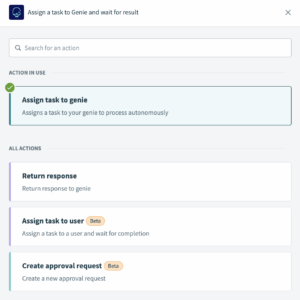
Assign tasks to Genies directly within recipes, skills, or MCP/API endpoints so they can operate autonomously and drive complex, AI-powered workflows. Use the “Assign task to Genie” action to define the goal, pass input data or files, and maintain context with a conversation ID. The Genie executes the task, retrieving, analyzing, or collaborating with other Genies, and returns either free-form results or structured data pills for seamless downstream automation.
Example: Streamline expense management with multi-agent collaboration that ensures policy compliance.
- An expense review Genie extracts data from receipts, categorizes expenses by type, and validates each line item against travel and spending policies.
- An approval Genie takes the validated report, checks budget availability for the department, and determines approval requirements based on amount and flags.
- The approval Genie either auto-approves compliant reports or routes exceptions to the appropriate manager with specific policy violations highlighted. This reduces reimbursement time while maintaining spend controls and audit trails.
Granular RBAC Permission Settings for Conversation History and Test Mode
Available Now
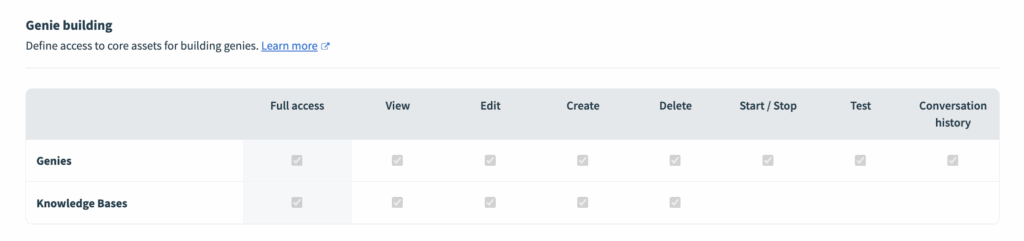
New granular permission settings give administrators precise control over Conversation History and Test Mode data in Agent Studio. Conversation History contains all historical chat records between Genies and users, which may include private information. Test Mode allows builders to query Genies and retrieve data from connected Knowledge Bases.
Admins can now configure which roles have access to Test Mode and Conversation History. For new customers, these permissions are disabled by default. This provides control to balance builder productivity with governance requirements.
Enhanced UX Features on Microsoft Teams
Available Now
We’ve improved the Microsoft Teams Genie experience with features that allow end users to actively restart Genie chats and see a descriptive stream of Genie actions and thought processes.
Restart Chat Command: End users can restart chats with the Genie by simply typing “restart.” Admins can also add this as a prompt suggestion in the Teams app configuration.
Genie Thought Process Visibility: Users can now see how the Genie is working to complete their request, providing transparency into the agent’s decision-making. This feature is available on the latest Microsoft Teams version.
MCP Gateway
Verified User Access for MCP Servers
Available Now
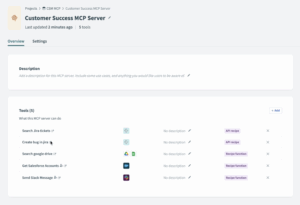
Verified User Access for MCP servers enables end users to authenticate with their own credentials when interacting with MCP tools, such as recipe functions, Enterprise Skills, and API recipes.
You can configure all of these within a single server, eliminating the need to set up separate API endpoints and collections. Set the authentication to Workato Identity (OAuth 2.0) for each tool. All subsequent tool executions will use individual user credentials, automatically respecting their specific permissions. This means AI agents can work autonomously while maintaining enterprise security standards, eliminating the risks of shared accounts, providing complete audit trails of agent actions, and ensuring that agentic workflows respect the same access controls as users. This enables organizations to deploy AI agents at scale across OAuth-enabled systems like Jira, Salesforce, and Google Suite without compromising security governance.
Examples:
- Jira: Users can only view and modify issues they have permission to access.
- Salesforce: Sales team members access only their assigned accounts and opportunities.
- Document Processing: Each user works with files they’re authorized to access in SharePoint or Google Drive.
Security & Operations
Key Workato AI Features Now Available in EU Data Center
Available Now
Key Workato AI capabilities are now available in our EU data center. All models are hosted locally, ensuring data never leaves the EU and maintaining full GDPR compliance.
AI features now available in EU:
- Workato Enterprise MCP: Enables secure orchestration and governance of AI agents using MCP servers.
- Agent Studio: Provides a unified platform to build, deploy, and govern enterprise-ready Genies (our AI agents) safely across the enterprise.
- Workato GO: Combines search, enterprise context, and Genies, allowing users to trigger Deep Action™ through natural language.
- Intelligent Document Processing (IDP): Automates data extraction from semi-structured and unstructured documents like receipts, emails, and handwritten notes.
- AI by Workato: Embeds generative AI capabilities directly into recipes for smarter decision-making and content generation.decision-making and content generation.

This eliminates the primary blocker to agentic AI adoption in the EU: data sovereignty.
Global Language Support Now Available
Available Now
Additional languages are now generally available across Workato Platform, Workato GO, and LCAP. International teams can now build and collaborate in their preferred languages.
Available languages:
- English
- Japanese
- Korean
- Chinese
- German
- Spanish
- French
- Portuguese
Language selection is individual. Your choice doesn’t affect other team members. This allows teams to work together, even in different languages.
Advanced Project-Level Permissions (RBAC 2.0)
Available Now
Project-Level Permissions allow you to manage access to specific projects through group assignments, enhancing security and administrative efficiency while preventing “role sprawl.”
Set specific access levels for each project, create and manage permissions through collaborator groups, and assign Project Administrators with project-level access management rights without granting full workspace admin privileges. RBAC 2.0 includes Developer API support and SAML/SCIM integration for programmatic management.
The bulk migration tool is also now available. Migrate all custom roles in one click with a two-step process that consolidates duplicate roles, automatically creates collaborator groups, preserves exact access patterns, and ensures zero downtime.
All new workspaces automatically benefit from these advanced permissions.
Low Code Apps
Verified User Access for Low Code Apps
Available Now
Verified User Access is now supported for Low Code App recipes, ensuring that actions taken inside Low Code Apps execute using the identity and permissions of the end user.
This ensures components (e.g., dropdowns) only load data that the authenticated user has permission to see in external systems. This also ensures actions executed via UI events (e.g., page load, button click, dropdown changes, table row selections) use the end user’s permissions.
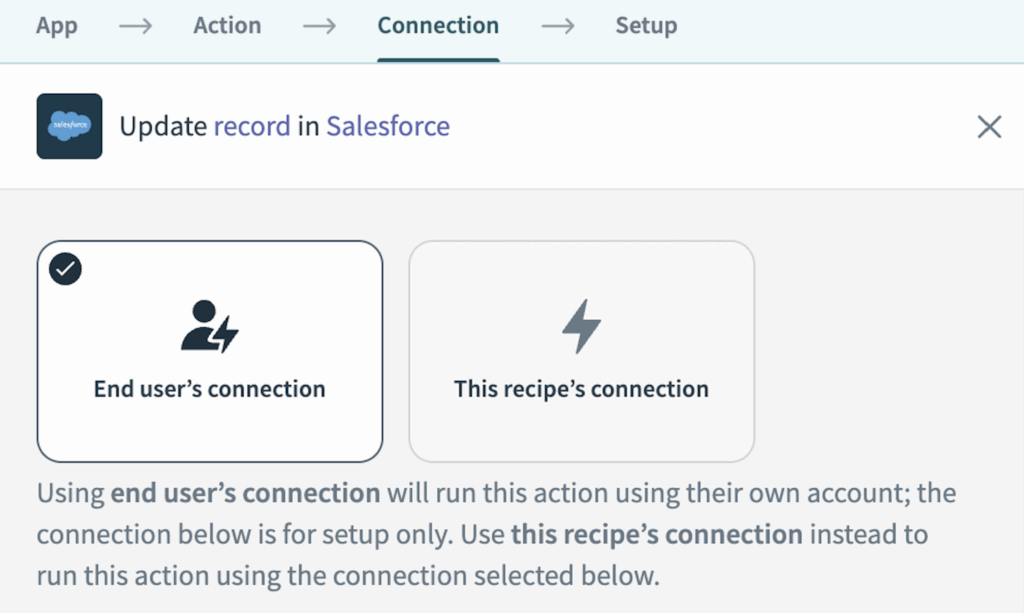
Verified User Access for Low Code Apps ensures that every interaction within your custom applications—from loading dropdown options to executing button clicks—runs with the authenticated user’s individual credentials and permissions. This eliminates the security risks and compliance challenges of shared accounts, while ensuring users only see and interact with data they’re authorized to access. The result is enterprise-ready custom applications that can securely integrate with OAuth-based systems with built-in governance and full auditability.
Example: Build a custom Jira issue management app where each team member sees only their assigned issues in the dropdown list. When they update an issue status or add a comment, the action executes with their individual Jira credentials, respecting their specific permissions in Jira
Custom Apps with Real-Time Interactions
Available Now
You can now build custom Low Code Apps entirely with recipes. This release brings real-time interactions between your UI and backend recipes. Perfect for creating apps such as CRM or HR interfaces, employee directories, and admin panels.
Example: Build a custom Jira issue management app where each team member sees only their assigned issues in the dropdown list. When they update an issue status or add a comment, the action executes with their individual Jira credentials, respecting their specific permissions in Jira.
Key details:
- Trigger recipe actions on page load, button clicks, dropdown changes, date picker updates, and table row selections.
- Load data into table widgets, dropdowns, text/number fields, and images.
- Build custom UIs, configuration panels, and supercharge business process automation scenarios.
- UI triggers and actions include setting component values, showing warnings, reloading tables, and more.
- Page variables add flexibility and dynamic logic across components.
Sharing Requests with Participants
Available Now
Share requests with additional participants using recipes, giving you better control over who can see and interact with requests at enterprise scale.
What’s new: Previously, only the current assignee, requestor, and app managers could view requests. Now you can share requests with additional participants who can view details and engage in communications.
Use cases:
- Share with approvers so they can continue to see requests after approval
- Add observers who need to monitor requests without manager privileges
- Include participants for communication purposes
Shared participants can view and comment on requests but cannot make decisions on unassigned tasks. Use the unshare action to remove participants when needed.
Builder Experience
Test Jobs Now Run Without Limitations
Available Now
Test jobs now behave just like regular jobs. Gone are the days when test jobs would get stuck in processing state, requiring you to start the recipe or manually trigger another test. With this update, you can confidently test any recipe end-to-end with zero friction.
Connectivity
OPA 29.1 Released
Available Now
The latest On-Prem Agent release introduces:
Data Pipelines: Added support for SQL Server as a data destination, expanding your data integration options.
Security: Updated Spring LDAP to version 3.2.14, ensuring the latest security enhancements are in place.
Read the OPA 29.1 release notes for further details.
Connectivity Updates: New Connectors and Enhancements
As always, check out the community connector and platform connector blogs in the Product Hub.
Stay Tuned for December
We hope you found this month’s updates exciting and continue to discover new ways to Workato!
To read about these updates as they are released, check out our Changelog.